

Mint died, and millions of people suddenly found themselves scrambling for a new way to track their money.
When Intuit pulled the plug in March 2024, they funneled users toward Credit Karma. But that replacement felt half-baked at best. So I spent months testing every serious Mint alternative to find apps that could actually handle real-world budgeting, not just show you pretty graphs.
Here’s what I learned after connecting dozens of accounts, setting up multiple budgets, and dealing with way too many two-factor authentication codes.
Quicken Simplifi Does Everything Right
Simplifi nailed the basics without overcomplicating things.
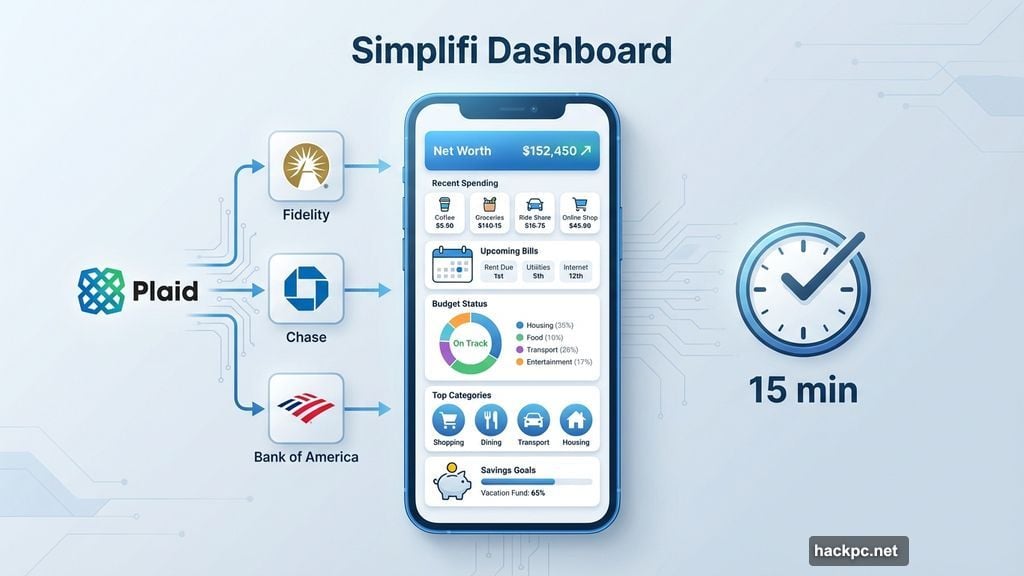
The landing page is one continuous scroll showing your complete financial picture. Net worth sits at the top. Below that, recent spending, upcoming bills, budget status, top categories, and savings goals all flow together naturally. No hunting through tabs or menus.
Setup took about 15 minutes. Most banks connected instantly through Plaid, including Fidelity, which gave other apps trouble. Plus, Simplifi lets you invite a spouse or financial advisor to co-manage your account. That’s rare among budget trackers.
The recurring expense detection impressed me most. Instead of forcing you to mark every Amazon purchase as recurring, Simplifi lets you specify which ones repeat monthly. My two Subscribe & Save orders? Recurring. Random impulse buys? One-time. That granularity matters when you’re trying to separate actual bills from discretionary spending.
Simplifi’s budgeting follows a straightforward approach. It calculates your “income after bills” by subtracting fixed expenses but not discretionary subscriptions. From there, you set spending targets by category. The app suggests amounts based on six-month averages, which beats pulling numbers from thin air.
One missing feature bugs me: no Zillow integration. Competing apps like Monarch Money and Copilot connect with Zillow to auto-update home values. Simplifi makes you add real estate manually, which feels unnecessarily tedious in 2026.
Still, at $72 annually, Simplifi costs less than most competitors while delivering a cleaner experience.
Monarch Money Rewards Patient Users
Monarch grew on me, but it took time.
The app demands more setup work than Simplifi. Editing categories, creating rules, and fine-tuning recurring transactions all require extra clicks. The mobile interface feels cramped for detailed work. Use the web version for initial configuration, then switch to mobile for daily check-ins.
Once configured, though, Monarch delivers impressive depth. The budget section displays a proper balance sheet comparing planned spending against actuals for each category. Monthly forecasts show projected cash flow. Recurring expenses can be tagged by merchant, amount, and other parameters simultaneously.
That level of control matters for complex budgets. My Amazon baby supply orders cost either $54.18 or $34.18 every month. Monarch automatically categorizes those specific amounts as “Baby” while treating other Amazon purchases differently. Most apps can’t handle that nuance.
Monarch also added detailed reporting recently. You can generate custom graphs based on accounts, categories, or tags. Plus, the app now auto-updates car values through an integrated aggregator. Combined with Zillow support for home values, that makes tracking assets much easier.
The mobile dashboard shows net worth, recent transactions, month-over-month spending, upcoming bills, investment snapshots, goals, and a detailed month-in-review. That review digs deeper than competitors, breaking down cash flow trends, net worth changes, and asset/liability shifts.
However, Monarch doesn’t distinguish bills from other recurring expenses, which seems like an oversight. And at $100 yearly or $15 monthly, it’s the priciest option here.
NerdWallet Costs Nothing But Shows Ads
NerdWallet proved that free budget tracking still exists.
The company makes money through credit card offers and financial product referrals plastered throughout the app. But if you can ignore the noise, NerdWallet handles core budgeting competently without charging a cent.
The interface stays clean despite the ads. Your cash flow, net worth, and credit score occupy prime real estate on the dashboard. Weekly insights highlight interesting patterns, like where you spent the most or how much you paid in fees compared to last month.
NerdWallet follows the 50/30/20 budgeting rule: 50 percent for needs, 30 percent for wants, 20 percent for savings or debt repayment. If that framework works for you, great. But you can’t customize spending categories yet. The app promises that feature is “coming in the future,” though the company wouldn’t provide a timeline.
Setup takes longer than competitors. NerdWallet forces you through two-factor authentication every single time you want to add an account, even before you reach your bank’s login page. Then you do 2FA again at your bank. For someone linking seven accounts like I did, that process becomes exhausting.
NerdWallet also requires more personal information upfront because it offers credit score monitoring. You’ll need to provide your birthday, address, phone number, and last four digits of your Social Security number. That’s standard for credit tracking but feels invasive compared to simpler budget apps.
Still, free is free. And NerdWallet’s library of financial explainers adds genuine value beyond budgeting.
Copilot Money Looks Great But Stays iOS-Only
Copilot might be the best-looking budget app I tested.
Colors, emoji, and graphs work together to make financial data feel approachable. The app visualizes recurring expenses better than any competitor. Its AI-powered categorization gets smarter over time and rarely misclassifies purchases after the first week.
Copilot also offers Amazon and Venmo integrations that show transaction details. For Amazon, just sign in through an in-app browser. Venmo requires setting up email forwarding, but the extra detail helps when you’re trying to remember what that $47 payment was for.
Like Monarch, Copilot supports Zillow integration for tracking property values. And it marks new transactions for review, which helps catch fraud and makes you more conscious of spending patterns.
Here’s the problem: Copilot only works on iOS and Mac. No web version exists yet, and Android users are completely locked out. CEO Andres Ugarte publicly promised both are “coming soon,” but until they arrive, most people should look elsewhere.
Even on iOS, Copilot lacks features that competitors consider standard. Detailed cash flow reports are “almost done,” according to Ugarte. Advanced AI features like forecasting and benchmarking remain in development.
At $95 yearly or $13 monthly, Copilot costs less than Monarch but more than Simplifi. The app shows promise, especially for Apple users who prioritize design. But it’s not ready to be anyone’s primary recommendation yet.
YNAB Forces You To Think Differently
You Need a Budget (YNAB) takes a radically different approach to personal finance.
The app follows zero-based budgeting, where you assign every single dollar a job. Money you’ll earn later this month doesn’t matter. Only cash currently in your accounts gets budgeted. Think of it as the digital version of envelope budgeting: put money in different envelopes for rent, groceries, car repairs, and unexpected expenses.
YNAB doesn’t care about your salary or recurring income. It doesn’t do forecasting. Instead, you draft a new budget each month and manually review every transaction. The app forces intentionality in a way that other budget trackers don’t.
That discipline helps some people. My colleague Valentina Palladino has used YNAB for years to save for major goals like weddings and home purchases. She swears by the method.
For me, though, YNAB feels like overkill. The learning curve is steep. The mobile interface makes certain tasks unnecessarily complicated. And the constant manual input becomes a chore when simpler apps can automate most of that work.
If you struggle with impulse spending or need to build serious savings fast, YNAB’s approach might click. But at $110 yearly or $15 monthly, it’s the most expensive option here. And most people will find something like Simplifi or Monarch easier to stick with long-term.
What Happened To The Free Options
PocketGuard used to offer a decent free tier. Not anymore.
The company now limits free access to a seven-day trial. After that, you’ll pay $13 monthly or $75 annually. For that price, you get fewer features than Simplifi while dealing with a clunkier interface and occasional bugs.
The “accounts” tab feels cluttered and doesn’t show category totals for cash or investments. The web version just blows up the mobile layout instead of taking advantage of extra screen space. And more than once, the app prompted me to install updates that didn’t exist.
PocketGuard isn’t bad exactly. But when you’re paying $75-$156 per year, other apps deliver more value.
Understanding Plaid Before You Connect
Every budgeting app here uses Plaid to connect with your banks.
Plaid operates as the middleman between budget trackers and over 12,000 financial institutions. When you link an account, Plaid securely passes your balance, transaction history, and account details to the budgeting app.
The company uses encryption and promises not to sell customer data. However, Plaid paid $58 million in 2022 to settle a class action lawsuit alleging it collected more financial data than necessary. As part of that settlement, Plaid agreed to give users more transparency and minimize data collection.

You’ll interact with Plaid every time you add a bank account. The process typically involves searching for your bank, entering your login credentials, and completing two-factor authentication. Some apps, like NerdWallet and Monarch, add extra security layers that require 2FA before you even reach the Plaid screen.
The whole thing feels tedious when you’re setting up multiple accounts. But it only happens once. And the security measures exist for good reasons.
Why Mint Actually Died
Intuit never explained why it killed Mint in December 2023.
The company simply announced that millions of Mint users would migrate to Credit Karma, another Intuit property. In my testing, Credit Karma proved to be an inadequate replacement, lacking many features that made Mint useful.
My guess? Intuit wanted to consolidate its personal finance offerings and figured Credit Karma’s credit monitoring features would retain most Mint users. That bet seems to have backfired based on how many former Mint users I’ve seen searching for alternatives.
The good news is that several strong options exist now. You just have to be willing to pay for most of them.
Pick Based On Your Priorities
No single budget app works for everyone.
If you want simplicity and good value, choose Quicken Simplifi. It does everything most people need without overwhelming you with options. Plus, it costs less than competitors.
If you need maximum control and don’t mind a steeper learning curve, try Monarch Money. The extra depth justifies the higher price for people with complex finances.
If you’re broke or just don’t want to pay, NerdWallet works fine despite the ads. You’ll miss some features that paid apps offer, but it covers the basics.
And if you use Apple devices exclusively and care deeply about design, Copilot shows promise. Just know that it’s still playing catch-up on features that other apps mastered years ago.
Whatever you choose, take time to set it up properly. Connect all your accounts, review recurring expenses, and adjust the suggested budget categories. Every app here makes assumptions that won’t perfectly match your life. The more you fine-tune things upfront, the more useful the app becomes long-term.
Your budget shouldn’t feel like homework. Find the app that fits your style, then actually use it.




Comments (0)