
Hackers found a clever new way to steal Facebook credentials. They’re not just copying login pages anymore. Now they’re faking entire browser windows to trick you into handing over your password.
Worse, this attack targets the exact people least likely to spot it. So even if you barely use Facebook, you need to know about this threat. Your relatives probably don’t.
What’s Actually Happening Here
The attack uses something called browser-in-the-browser, or BITB for short. It’s deceptively simple but terrifyingly effective.
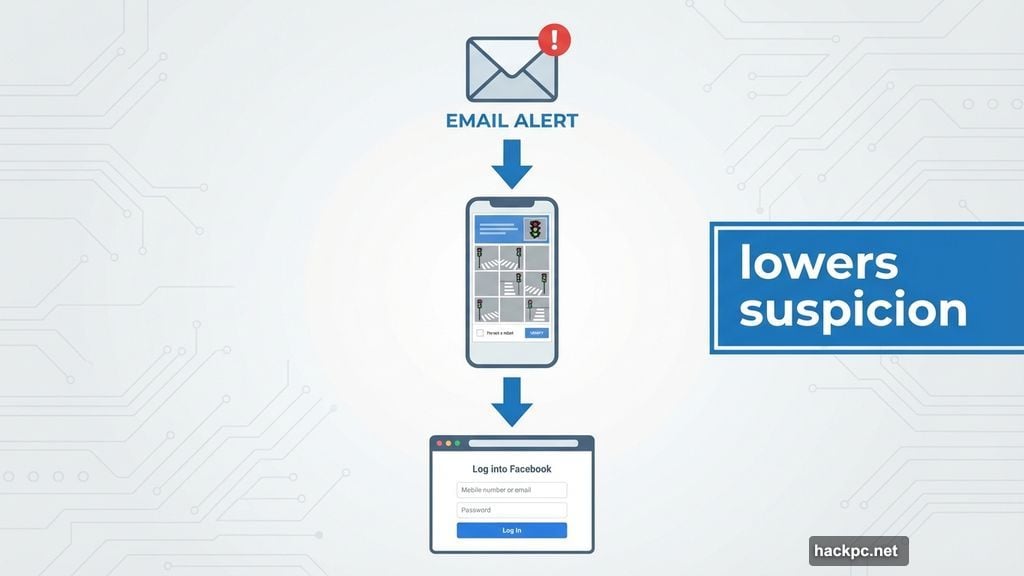
Here’s how it works. You get an email or text claiming there’s a problem with your Facebook account. Nothing unusual yet. But when you click the link, you see what looks like a legitimate Facebook login page inside a real browser window.
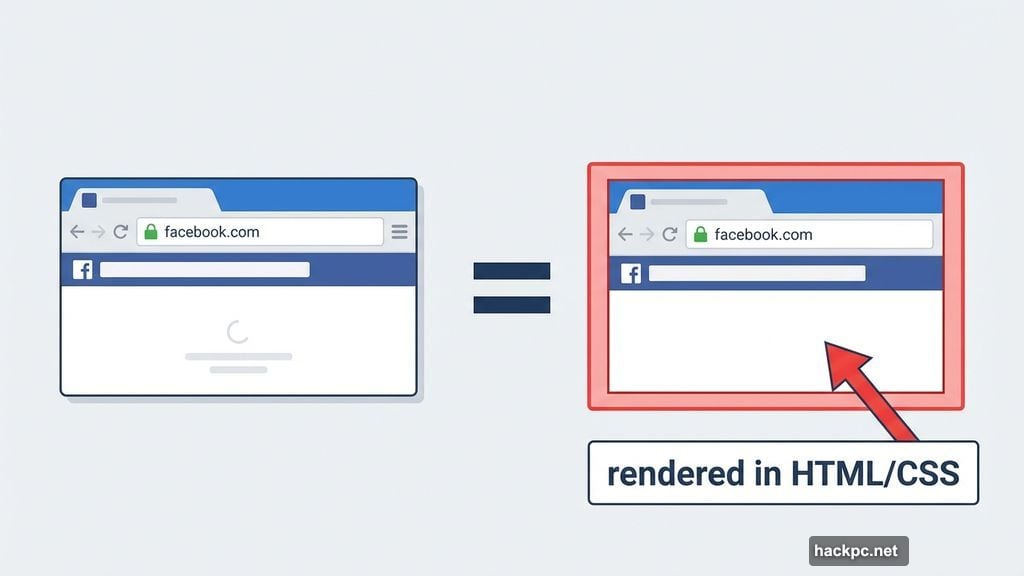
The URL bar shows “facebook.com” exactly as it should. The browser chrome looks perfect. Every visual element checks out. Yet none of it is real.
Instead, hackers created a fake browser window rendered entirely within a webpage. That includes the address bar, the window frame, and all the security indicators you normally trust. So when you type your password, it goes straight to criminals instead of Facebook.
Why Facebook Makes Such a Tempting Target
Facebook has over two billion daily active users. That’s a massive pool of potential victims. But the numbers tell only part of the story.
Many Facebook users aren’t particularly tech-savvy. They grew up before widespread internet use. They trust emails at face value. Plus, they often reuse passwords across multiple sites.
That combination creates perfect conditions for hackers. One successful phishing attack can compromise not just a Facebook account, but potentially email, banking, and other sensitive accounts using the same credentials.
Moreover, Facebook accounts contain valuable personal information. Names, birthdays, family connections, photos spanning decades. Identity thieves can build comprehensive profiles from a single compromised account.
Captcha Tricks Lower Your Guard
Attackers often add a Captcha verification step before showing the fake login page. You know, those “I’m not a robot” challenges asking you to identify traffic lights or crosswalks.
Why? Because Captcha makes the page feel more legitimate. Real services use Captcha to prevent automated attacks. So seeing one confirms you’re dealing with a serious security-conscious platform.
At least, that’s what your brain assumes. In reality, the Captcha serves no technical purpose here. It just makes you less suspicious when the login page appears next.
Security researchers from Trellix report seeing this technique increasingly in the wild. The attacks are getting more sophisticated and harder to spot at a glance.
How to Spot the Fake
Fortunately, these fake browsers have an obvious weakness. They can’t actually function like real browsers because they’re just images and code rendered on a webpage.
Try to drag the title bar of the browser window. Grab where you’d normally click to move a window around your screen. If it won’t move, you’re looking at a BITB attack.
Real browser windows respond to dragging. Fake ones rendered in a webpage can’t. That simple test reveals the deception immediately.
Also pay attention to how the window behaves. Can you resize it? Does it respond to keyboard shortcuts like closing or minimizing? If the browser elements don’t act like a real browser, something’s wrong.
The Smarter Defense Strategy
Here’s a better approach that works every time. Never log in by clicking links in emails or texts.
When you get an alarming message about your Facebook account, don’t click anything in that message. Instead, open a new browser window yourself. Type “facebook.com” directly into the address bar. Then log in normally.
If there’s actually a problem with your account, you’ll see warnings on the real Facebook site. No problem there? The email was fake. Delete it and move on.
This simple habit defeats BITB attacks completely. Fake browser tricks only work when you visit the attacker’s specially crafted page. Skip their link entirely, and you skip their trap.
Better yet, enable two-factor authentication on your Facebook account. Even if someone steals your password, they can’t log in without the second verification code sent to your phone.
Why This Matters Beyond Facebook
BITB attacks aren’t limited to Facebook. Hackers can use this technique against any login page. Banking sites, email providers, work systems, streaming services. Anywhere you enter a password becomes a potential target.
The underlying principle stays the same. Fake browser elements make fraudulent pages look legitimate. Users trust the visual cues they’re trained to recognize. So they hand over credentials without realizing the danger.
Plus, this attack bypasses many traditional security warnings. Your actual browser isn’t visiting a dangerous site. You’re viewing a legitimate page that happens to contain malicious content rendered to look like a browser.
So antivirus software and browser security features often miss these attacks. They scan the outer page and find nothing wrong. The fake browser exists entirely within HTML, CSS, and JavaScript on what appears to be a normal webpage.
What Happens After They Get Your Password
Once attackers have your Facebook credentials, the problems multiply fast. They might use your account to message friends and family with more phishing links. That spreads the attack while appearing to come from a trusted source.
Or they’ll search your account for sensitive information. Email addresses, phone numbers, birthdates, maiden names, favorite locations. All the data commonly used in security questions and identity verification.
Some attackers sell stolen credentials in bulk on dark web marketplaces. Your login might end up in a database alongside thousands of others, available to whoever wants to buy it.
Worse, if you reused that password elsewhere, every account with the same credentials is now compromised. Email, banking, shopping, work systems. One phishing success can cascade across your entire digital life.
The Real Problem Nobody’s Solving
Social platforms know about BITB attacks. Security researchers publish warnings regularly. Yet these attacks keep working because education lags far behind technique.
Most people still trust what they see on screen. Browsers look secure, so users assume they are secure. That fundamental assumption makes BITB attacks effective regardless of how old the underlying technique is.
Plus, the visual deception is simply too good. Skilled attackers can recreate browser interfaces pixel-perfect. Unless you know to test by dragging the title bar, you’d never notice the difference.
Meanwhile, email filters can’t reliably block these phishing attempts. The messages come from constantly changing addresses. They use legitimate-looking domain names. The URLs point to compromised but otherwise normal websites hosting the attack code.
So the burden falls entirely on users to recognize and avoid these threats. That’s not a sustainable security model. But it’s the reality we’re stuck with for now.
Stay skeptical. Test suspicious pages. Never follow login links from emails. Those simple habits remain your best defense against increasingly sophisticated attacks.




Comments (0)