
Snapchat just expanded its safety notifications. Now the app lets you automatically tell friends when you’ve reached any destination, not just home.
The update builds on last year’s “Home Safe” feature. That tool sent one-tap alerts when you arrived home. Now you can set recurring or one-time notifications for any location you visit regularly.
Think piano lessons, gym sessions, or weekly team practice. Instead of texting “I’m here” every time, Snapchat handles it automatically. The app detects your arrival and pings whoever you choose.
How Arrival Notifications Work
First, you need to share your location with specific friends. Remember, Snap Map keeps location sharing off by default. Nobody sees where you are unless you explicitly enable it.
Once you’ve chosen trusted contacts, open their friendship profile. Scroll to “Arrival Notifications” and pick a spot on the map. Give it a custom name like “yoga class” or “study group.”

Then decide if you want one-time or recurring alerts. One-time notifications expire after sending or within 24 hours. Recurring ones trigger every time you arrive at that location.
Your friend gets a notification when you reach the spot. No manual check-ins required. Plus, you control exactly who receives these updates and when they stop.
Privacy Controls Matter Here
Location data remains sensitive. Snapchat emphasizes that all sharing happens by choice. You decide who sees your location and which destinations trigger alerts.
You can disable notifications anytime. Delete saved locations whenever they’re no longer relevant. Friends can’t force you to share arrival updates or track your movements without permission.
This differs from always-on tracking apps. Arrival Notifications only activate for specific places you designate. The rest of your location history stays private unless you choose otherwise.
Competing With Established Players
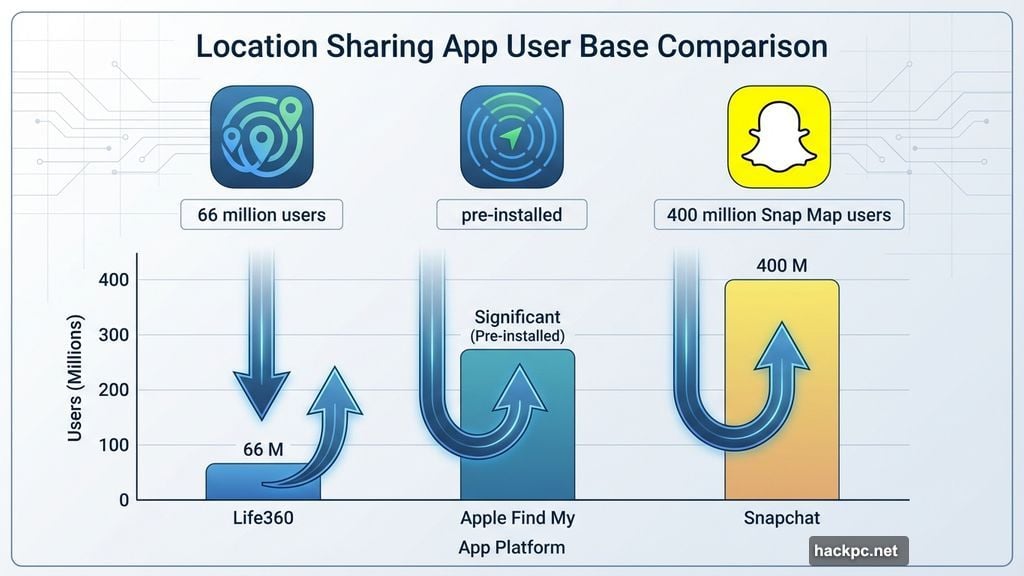
Snapchat faces tough competition in location sharing. Life360 dominates family safety tracking with over 66 million active users. Apple’s Find My comes pre-installed on every iPhone.
But Snapchat brings 400 million monthly Snap Map users. That’s significant reach for a feature launched in 2017. The platform evolved from showing friend locations to recommending local spots and activities.
Arrival Notifications leverage this existing user base. Parents tracking kids. Friends coordinating meetups. Teams confirming attendance. These use cases already happen through text messages.
Snapchat automates the process. Instead of remembering to text “made it to practice,” the app handles communication automatically. That convenience could convert existing users without requiring new app downloads.
Real-World Use Cases
College students commuting to campus can alert roommates when they arrive safely. Parents drop kids at after-school activities and automatically notify the other parent. Remote workers traveling for meetings can ping colleagues upon reaching hotels.
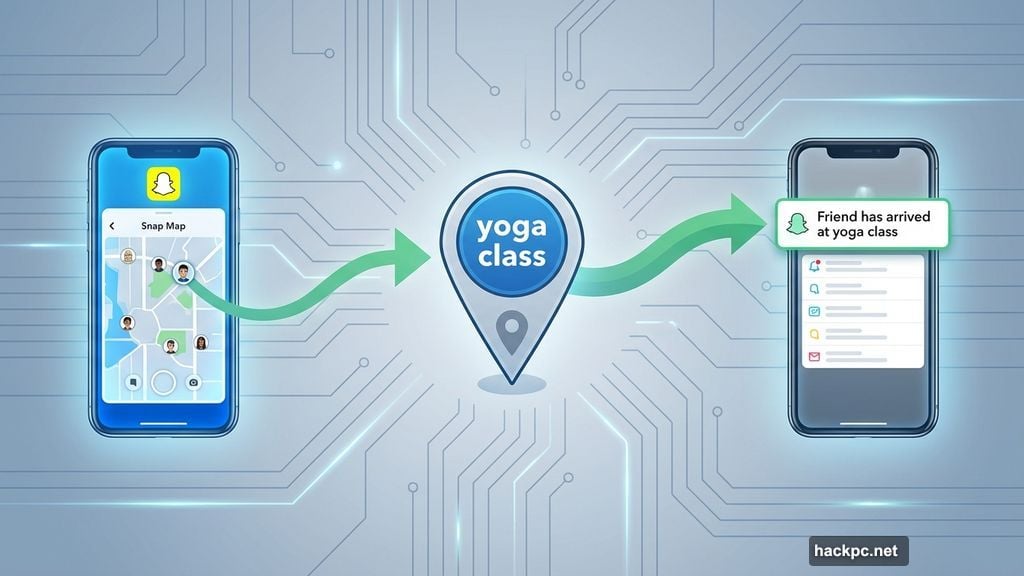
The recurring alerts solve repetitive check-ins. If you attend Wednesday yoga every week, set it once. Your workout buddy gets confirmation automatically without weekly texts. Same goes for therapy appointments, tutoring sessions, or volunteer shifts.
One-time alerts work for irregular trips. Visiting a friend’s new apartment? Set a temporary notification so they know when to unlock the door. Traveling alone? Let family know you’ve reached your Airbnb without manual updates.
Where This Could Go Wrong
Automatic location alerts create expectations. If someone knows you always send arrival notifications, missing one could trigger unnecessary panic. Technical glitches happen. GPS accuracy varies. Your phone might think you’ve arrived when you’re still two blocks away.
Plus, recurring notifications might overshare. Your weekly therapy appointments shouldn’t broadcast to everyone. Careful contact selection matters. Choose who receives each location’s alerts thoughtfully.
Battery drain also concerns frequent travelers. Background location tracking consumes power. If you’re running low on charge, these features might not work when needed most. Always have backup communication methods.
The Bigger Picture
Social platforms increasingly compete on safety features. After years of criticism about teen mental health and online risks, companies now emphasize protective tools.
Snapchat positions location sharing as user-controlled and optional. That contrasts with services requiring constant tracking. But it also means adoption depends entirely on individual choices.
Will people actually use Arrival Notifications? Or is this another feature that sounds useful but rarely gets enabled? Success depends on whether the convenience outweighs privacy concerns.
For some users, automatic arrival alerts genuinely help. Parents with busy teens. Friends who coordinate frequently. Anyone who forgets to send “I’m here” texts regularly.
For others, it’s just another way for apps to request location permissions. And once you grant that access, you’re trusting Snapchat with movement data regardless of notification settings.
The choice comes down to your specific needs and trust level. Just remember, once you share location data, you can’t unsee how companies use it.




Comments (0)