

Google just flipped the switch on Gemini AI for Chrome on iPhone and iPad. Desktop and Android users got it earlier this year. Now iOS joins the party.
The built-in AI assistant promises to summarize pages, help you learn new topics, and answer questions about whatever you’re reading. But like any AI tool, it comes with the usual warnings about accuracy. Let’s break down what’s new and whether it’s worth using.
How to Access Gemini in Chrome
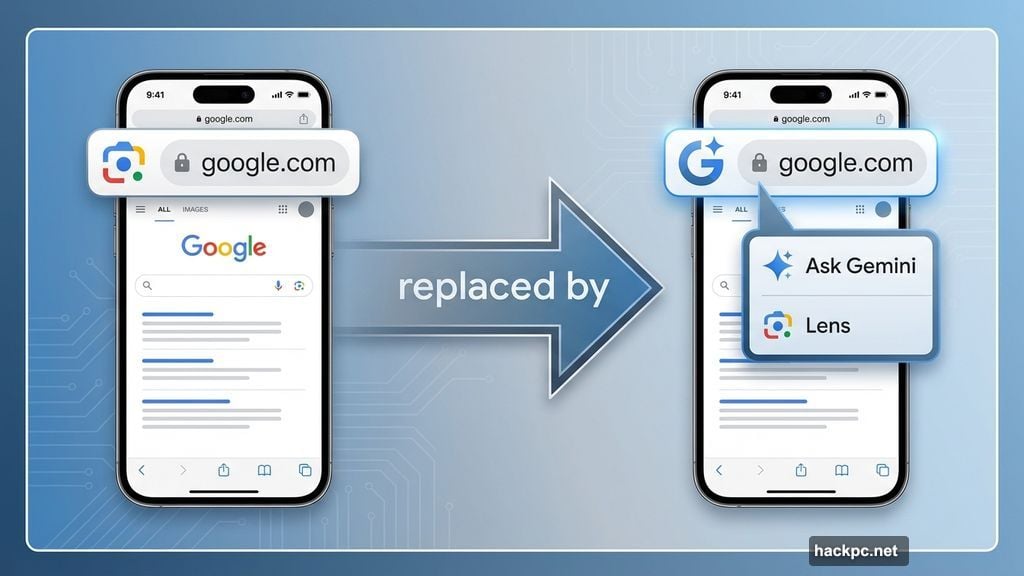
Finding Gemini takes one tap. Look for the spark icon at the left of Chrome’s address bar. It replaced the Google Lens camera icon.
Tap it. A “Pages tool” menu pops up with two options: Lens and “Ask Gemini.” Select Ask Gemini to start chatting.
By default, Gemini focuses on your current web page. But you can ask about anything. The chat interface floats over your page, which shifts to the background. That makes it easy to reference content while getting AI responses.
Plus, starting a new conversation is simple. Just tap the button in the top right corner. The overflow menu gives you quick access to chat history and settings.
What Gemini Can Actually Do
Google packed several practical features into this release. Some work better than others.
Page Summaries: Tap the suggestion to get key takeaways from any article. Works well for long-form content when you need the gist fast. But don’t trust it for critical information without verifying.
FAQ Generation: Gemini creates frequently asked questions based on the current page and similar sites. Helpful for research or learning new topics. However, the quality depends on source material.
Knowledge Testing: Ask Gemini to quiz you on subjects you’re learning. It generates questions to test comprehension. This feature shows promise for students or anyone picking up new skills.
Recipe Modifications: Need to adjust a recipe for dietary restrictions? Gemini can help. It suggests substitutions and alterations. Just double-check the suggestions make culinary sense.
Comparison Tools: Request product recommendations or information comparisons based on your preferences. Gemini analyzes options and offers suggestions. Again, verify before making purchases.
The chat interface accepts natural language questions. You can type anything from “Summarize this article” to “Explain quantum computing like I’m five.” Response quality varies based on question complexity and available information.
The Fine Print Nobody Reads
Google baked in several restrictions worth knowing about. These limitations affect who can use Gemini and how.
First, US users only. Sorry, international Chrome users. The feature requires your browser language set to English too. No multilingual support yet.
Second, you must sign into Chrome. Incognito mode? Nope. Gemini won’t work in private browsing. That makes sense given privacy concerns but limits use cases.
Third, age restrictions apply. Only users 18 and older get access. Google implemented this to comply with AI regulations and protect younger users.
Finally, rollout happens gradually. You might not see Gemini immediately even if you meet all requirements. Google’s staggered deployment means some users wait days or weeks.
Trust But Verify Everything
Here’s the part Google buries in disclaimers. Gemini can hallucinate. It makes mistakes. Sometimes it confidently states incorrect information as fact.
AI tools like Gemini generate responses based on pattern recognition, not true understanding. That means errors slip through. The summarization feature might miss key points. FAQ generation could include wrong answers. Recipe modifications might suggest dangerous substitutions.
So verify critical information. Cross-reference Gemini’s responses with authoritative sources. Don’t trust it for medical advice, legal guidance, or financial decisions. Use it as a starting point for research, not the final word.
Moreover, Gemini inherits biases from its training data. Expect occasional odd responses or perspectives that reflect those biases. That’s true for all AI assistants, not just Gemini.
Competing With ChatGPT and Others
Google enters a crowded market. ChatGPT, Claude, and other AI assistants already work on iPhone through dedicated apps or browser extensions.
What sets Gemini apart? Integration. It lives directly in Chrome without requiring app switches or separate logins. That convenience matters for quick questions or page summaries.
But standalone AI apps often offer more features and better conversation quality. They remember context across sessions. They handle complex multi-turn conversations better. Plus, they work across browsers and devices.
So Gemini fills a specific niche. Quick assistance while browsing. Summarizing content you’re actively reading. Testing knowledge about topics on screen. For deeper AI interactions, dedicated apps still win.
The Privacy Question
Feeding web pages to AI assistants raises obvious privacy concerns. What data does Google collect? How long does it store conversations? Who sees your queries?
Google’s privacy policy covers Gemini interactions. But the details matter less than the principle. Assume anything you tell Gemini gets analyzed and potentially stored.
That means avoid sharing sensitive information. Don’t paste passwords, financial data, or personal details into Gemini chats. Treat it like any other cloud service where data leaves your device.
Moreover, Gemini analyzes page content. So if you’re reading confidential documents or private communications, think twice before invoking AI assistance. The convenience isn’t worth potential data exposure.
Worth Using or Overhyped?
Gemini in Chrome offers genuine utility for casual browsing. Quick summaries save time. Knowledge testing helps learning. Recipe modifications inspire creativity.
But it’s not revolutionary. Other AI tools provide similar features with better accuracy. The integration advantage is nice but not essential.
My take? Use it for low-stakes tasks. Summarizing news articles. Getting recipe ideas. Testing your understanding of simple concepts. Just don’t rely on it for anything important without verification.
The real test comes months from now. Will Google improve accuracy? Add features? Expand availability? Or will Gemini become another forgotten Chrome experiment?
For now, it’s a mildly useful tool that lives where you browse. That convenience alone makes it worth trying. Just keep expectations realistic and trust nothing critical to AI assistance.




Comments (0)