
Password length matters. But it won’t save you from getting hacked.
For years, security advice stayed consistent: make passwords longer. Add more characters. Throw in symbols. Mix cases. You’ll be safer.
That’s partially true. But length alone creates a false sense of security. Modern attacks bypass long passwords entirely through credential stuffing, phishing, and breach databases.
Here’s what actually determines password strength, and why your 20-character password might be weaker than you think.
Length Buys Time Against Brute Force
Password strength comes down to entropy. That’s how many possible combinations an attacker must try.
More characters mean more combinations. A 16-character random password like v9$QmR!2Zp#L8w@D could take centuries to crack with current computing power. An 8-character password like S3cur3!9 might fall in hours with modern cracking tools.
That’s why the National Institute of Standards and Technology now recommends long passwords over short complex ones. Length directly increases the time needed for brute force attacks.
But here’s the catch. Length only helps against one specific attack method. And most successful breaches don’t use brute force anymore.
Predictable Patterns Kill Long Passwords
Length means nothing if attackers can guess your pattern.
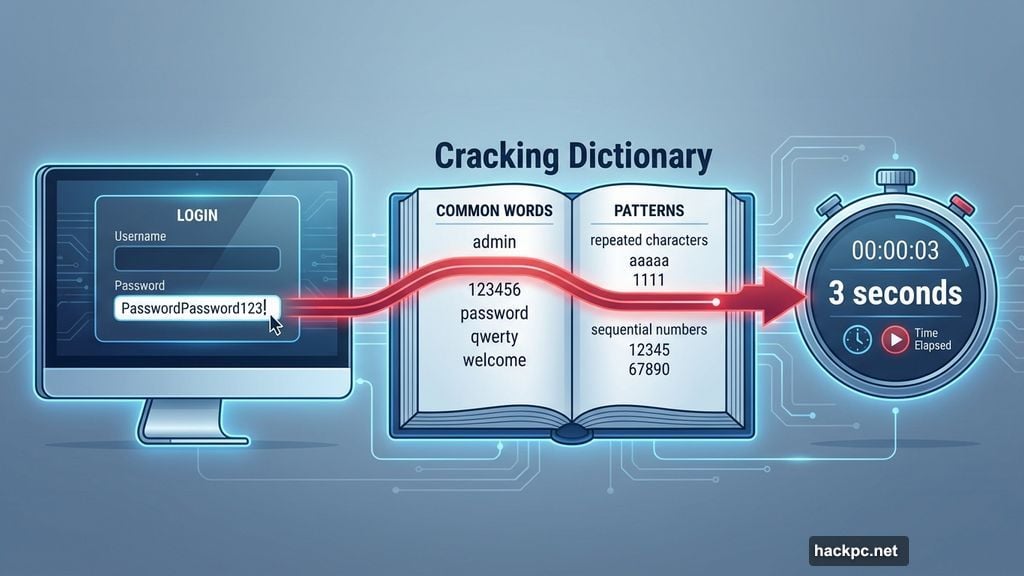
Take PasswordPassword123! as an example. That’s 21 characters. It meets most length requirements. But it follows predictable patterns that password crackers exploit first.
Common words, repeated characters, and sequential numbers appear in cracking dictionaries. Attackers test these patterns before attempting random combinations. So your long password fails in seconds instead of centuries.
Random generation solves this problem. A truly random 12-character password beats a predictable 20-character one every time. The difference is entropy, not length.
Reused Passwords Expose Every Account
Using the same long password everywhere creates a single point of failure.
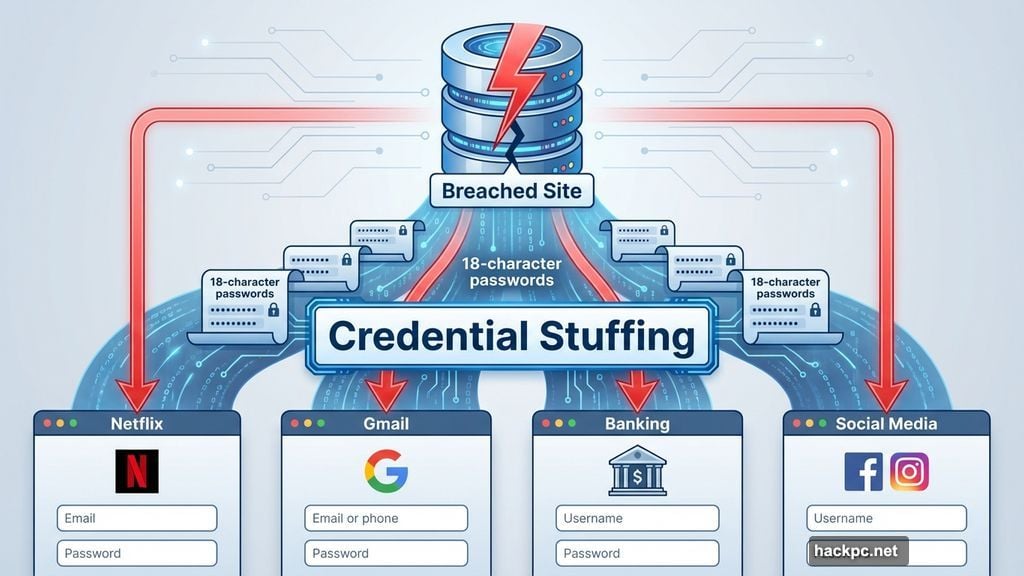
When one site suffers a data breach, attackers harvest credentials. Then they try those same credentials on other popular services. This tactic is called credential stuffing.
Your 18-character password offers zero protection here. Attackers don’t crack it. They just use the leaked version across Netflix, Gmail, banking sites, and anything else they can access.
In fact, reused passwords account for more successful attacks than weak passwords. One breach compromises everything. Length becomes irrelevant.
Phishing Bypasses Password Strength Entirely
Phishing attacks don’t care about password length or complexity.
You type your credentials into a fake login page. Attackers capture them directly. No cracking needed. No brute force required. They just wait for you to hand over the password yourself.
These fake pages look increasingly legitimate. They copy real login screens perfectly. Many include valid security certificates. Some even show in search results above the real site.
So even a randomly generated 25-character password fails the moment you enter it on a phishing site. The attack bypasses password strength completely.
Passphrases Balance Memory and Security
Passphrases offer a better middle ground for passwords you must remember.
A passphrase strings together unrelated words like river-battery-moon-carpet. It’s long enough to resist brute force. Random enough to avoid dictionary attacks. Yet memorable enough that you don’t need to write it down.
This approach works especially well for master passwords. Your password manager master password. Device logins. Encryption keys. Anywhere you can’t rely on autofill.
The key is true randomness. Don’t use song lyrics, quotes, or connected phrases. Attackers test those patterns too. Generate passphrases with dice or specialized tools that ensure randomness.
Password Managers Solve Most Problems
Security experts agree on one thing. Randomly generated passwords stored in password managers beat everything else.
Password managers generate long, unique passwords for every account. You don’t remember them. Don’t type them. Don’t reuse them. The manager handles everything.
This eliminates most attack vectors. Credential stuffing fails because every password is unique. Predictable patterns disappear because generation is random. Phishing still works, but only for the one site you’re tricked on.
The tradeoff is obvious. You’re trusting one tool with everything. That makes your master password critical. So is two-factor authentication. And keeping recovery options current.
But for most people, this tradeoff improves security dramatically. You trade memorizing dozens of passwords for securing one master password properly.
Breached Passwords Need Immediate Changes
Length doesn’t matter once a password appears in a breach database.
Sites like Have I Been Pwned track billions of compromised credentials. Attackers download these databases and test them first. So if your long password leaked three years ago, it’s already in the cracking tools.
Many password managers now check against breach databases automatically. When they flag a password as compromised, change it immediately. Doesn’t matter how long or complex it was. The breach makes it worthless.
This is another advantage of unique passwords per site. A breach only affects one account. With reused passwords, one breach compromises everything.
Two-Factor Authentication Adds Necessary Friction
Strong passwords aren’t enough anymore. Two-factor authentication adds a second verification step.
Even if attackers steal your password through phishing or breaches, they still need your phone or authentication app. This blocks most attacks cold.
Enable two-factor authentication everywhere it’s offered. Use authentication apps like Authy or Google Authenticator instead of SMS when possible. SMS codes can be intercepted. App-based codes can’t.
This doesn’t replace strong passwords. It supplements them. Think of it as a backup lock when the first one fails.
Passkeys Eliminate Password Problems
The newest solution replaces passwords entirely with passkeys.
Passkeys use biometric verification or device-based sign-ins. Your fingerprint. Face recognition. Device PIN. Attackers can’t phish them because there’s nothing to steal. Can’t brute force them because there’s no password to crack.
Major services are rolling out passkey support now. Google, Apple, Microsoft, and others support them. When available, enable passkeys immediately.
They’re not perfect yet. Not every site supports them. But they solve password problems by removing passwords from the equation entirely.
Layer Your Defenses
Password security isn’t one magic rule. It’s multiple protections that work together.
Use a password manager for random, unique passwords. Create a strong master passphrase. Enable two-factor authentication everywhere. Change passwords exposed in breaches. Watch for phishing attempts. Switch to passkeys when available.
Length matters. But it’s just one piece. A 30-character password still fails if you reuse it, type it into a phishing site, or use predictable patterns.
So yes, make your passwords long. But more importantly, make them unique, random, and protected by additional security layers. That’s what actually keeps accounts safe.


Comments (0)