

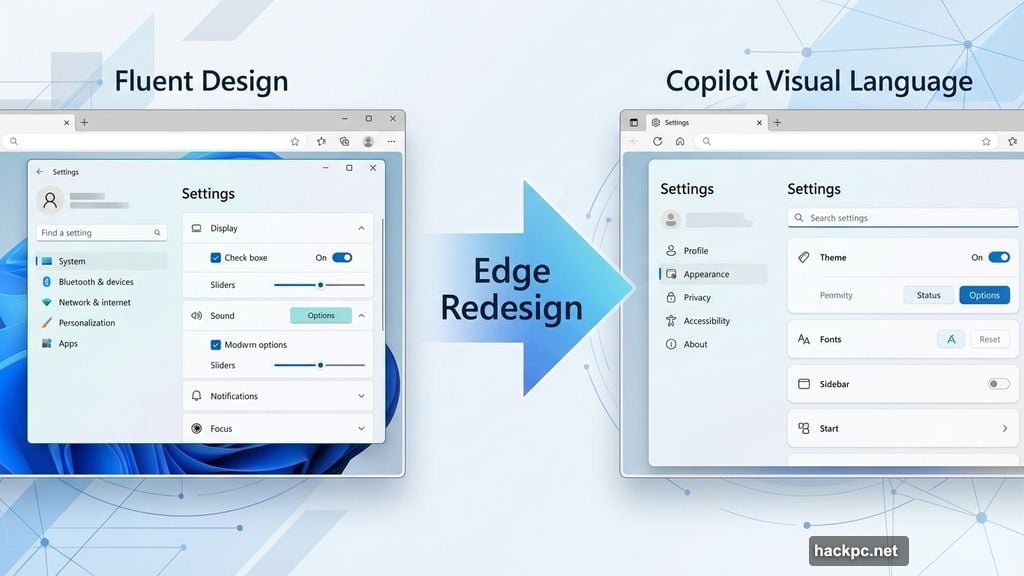
Microsoft just started rolling out a radical visual overhaul to Edge browser. The new design ditches Microsoft’s familiar Fluent design system entirely. Instead, it borrows the sleek, AI-focused interface from Copilot.
This isn’t a small tweak. Edge’s settings, menus, and new tab page now mirror Copilot’s distinctive style. Plus, the changes appeared in early Canary and Dev builds first, signaling Microsoft’s serious intent.
But here’s the bigger story. This design shift might preview how all Microsoft software looks soon.
Copilot’s Visual DNA Spreads Fast
The redesign brings rounded corners, updated color schemes, and typography lifted straight from Copilot. Even Edge’s settings page now looks identical to the Copilot app interface.
Windows Central spotted the changes first. The new tab page particularly stands out. It matches Copilot’s clean, minimalist aesthetic perfectly.
Importantly, these visual changes aren’t tied to Edge’s existing Copilot Mode feature. Microsoft is applying this design language broadly across the entire browser. So every Edge user will see it, regardless of whether they use AI features.
Why Microsoft Chose This Path
Mustafa Suleyman, Microsoft’s AI CEO, explained the strategy last year. The company won’t build a separate AI browser. Instead, Edge evolves to become that AI-first experience.
“There isn’t going to be a new browser; this is just going to be one experience,” Suleyman told The Verge’s Notepad newsletter.
That statement makes more sense now. By adopting Copilot’s visual language, Edge signals its AI focus without requiring users to switch products. The interface itself communicates Microsoft’s priorities.
Where This Design Came From
Copilot’s distinctive look arrived after Inflection AI’s team joined Microsoft in 2024. The design closely resembles Pi, the AI assistant Inflection built before the acquisition.
That origin story matters. Microsoft didn’t gradually evolve Fluent design toward AI aesthetics. Instead, they imported a completely different visual system built specifically for AI interaction.
So Copilot’s design represents intentional differentiation, not incremental refinement. It looks nothing like Windows 11, Office, or Microsoft’s other products.

The Windows Question Nobody’s Answering
Microsoft uses Copilot design in Edge now. But the company’s report suggests this might spread beyond browsers.
Windows Central notes the possibility of seeing “elements of this UI across Microsoft’s other web properties and perhaps even inside Windows.”
That’s the real story here. Will Windows 12 or the next major update abandon Fluent design? Microsoft hasn’t said publicly. But Edge’s transformation provides a clear blueprint.
Consider the implications. Consistent design across Windows, Edge, Office, and Copilot would strengthen Microsoft’s AI narrative. Users would see the same visual language everywhere, reinforcing the message that AI powers their entire experience.
Yet this creates tension with existing design systems. Fluent took years to implement across Microsoft’s product lineup. Abandoning it for Copilot’s aesthetic would require massive work.
What This Means for Edge Users
The practical impact arrives soon. Canary and Dev builds already show the new interface. Stable releases typically follow within weeks or months.
Most users will notice three immediate changes. First, rounded corners everywhere. Second, updated color schemes matching Copilot’s palette. Third, redesigned menus and settings pages.
Performance shouldn’t change. This refresh focuses purely on appearance. Your tabs, extensions, and bookmarks work the same way.
However, the visual shift might feel jarring initially. Edge looked like a traditional browser before. Now it signals “AI tool” through design alone.
The Bigger Microsoft Strategy
This redesign reveals Microsoft’s approach to AI integration. Rather than building separate AI products, they’re transforming existing software into AI-first experiences.
Edge leads this transformation. The browser serves as Microsoft’s testing ground for broader changes. If users accept Copilot design in Edge, expect similar updates across Microsoft’s ecosystem.

That strategy makes sense financially. Microsoft invested heavily in AI development. They need those investments to generate returns across their entire product portfolio, not just standalone AI apps.
So every Microsoft product becomes an AI product. Edge demonstrates how that transition looks visually.
Design Language Wars
Microsoft isn’t alone in rethinking software interfaces for AI. Google redesigned Assistant. Apple rebuilt Siri’s interface. Every major tech company faces the same challenge: how should AI software look different from traditional apps?
Microsoft’s answer through Copilot design emphasizes simplicity and conversation. Clean backgrounds, rounded elements, and prominent text input areas signal “talk to me” rather than “click through menus.”
Whether users prefer this aesthetic remains uncertain. Some might appreciate the fresh, modern look. Others might miss Fluent design’s familiarity.
But Microsoft clearly believes strongly in this direction. You don’t redesign your second-most-important product casually.
The company chose to transform Edge rather than incrementally adjust it. That signals conviction, not experimentation.




Comments (0)