
Privacy-focused VPNs love to talk big. Mullvad just does the work.
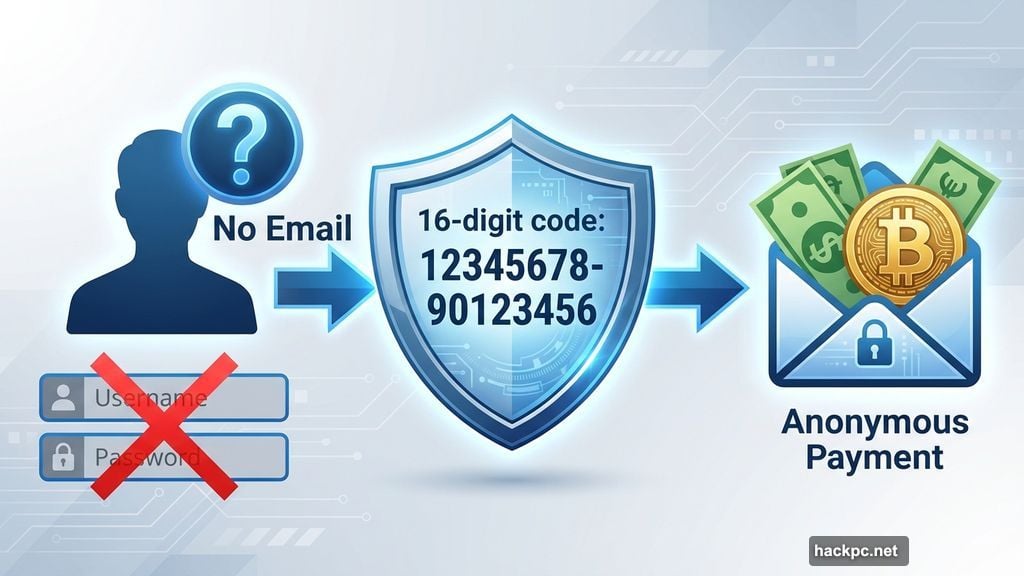
I’ve spent weeks testing this Swedish VPN that refuses to log anything, accepts literal cash payments, and represents every user as a random 16-digit code. No email required. No marketing cookies. Just anonymous access to the internet.
But privacy obsession means nothing if the apps crash or speeds tank. So I put Mullvad through my full testing protocol to see if it backs up its anti-tracking credentials with actual usable software.
Installation Works Without Fighting You
Mullvad’s apps install quickly on mobile. Desktop takes a few extra steps, but the software guides you through without confusion.
The interface stays consistent across platforms. Clean design, big buttons, minimal clutter. Plus, the map takes up most of the screen, which helps newcomers feel comfortable firing up security software.
My only real complaint? No automatic “fastest server” button. You have to assume the nearest location will perform best. Most of the time that’s true, but server congestion occasionally surprises you.
Windows and Mac Apps Share the Same Smart Design
Mullvad’s desktop clients use space efficiently without cramming information everywhere. You get what matters: connection status, server location, and a settings gear.
Click that gear to access DAITA (defense against AI traffic analysis), multihop routing, and other features. Some options get technical, but you can ignore them for a solid experience.
The Mac version used to lack split tunneling. That got fixed in a recent update. Now the only difference is that macOS can’t unpin the app from the taskbar. Minor annoyance at worst.
Mobile Apps Keep Things Simple
Android and iOS versions mirror the desktop approach. Big connect button, server selection, map, and settings. Everything responds instantly.
The mobile apps skip some UI customization options available on desktop. But they start polished enough that you won’t miss those toggles.
Browser Extension Misses the Mark
Mullvad’s Firefox extension is still in beta, and it shows. You can’t connect to the VPN through it. Its main function is connecting to a SOCKS5 proxy in a Mullvad location.
That’s useful for adding a second protection layer if you’re already running the desktop app. But the extension looks like a software glitch and duplicates what the main app already does perfectly.
Given Mullvad’s otherwise stellar track record, I expect they’ll figure out what to do with this. For now, skip it.
Speed Tests Show Average Performance
VPNs slow your connection. No avoiding it. The trick is keeping that slowdown manageable.
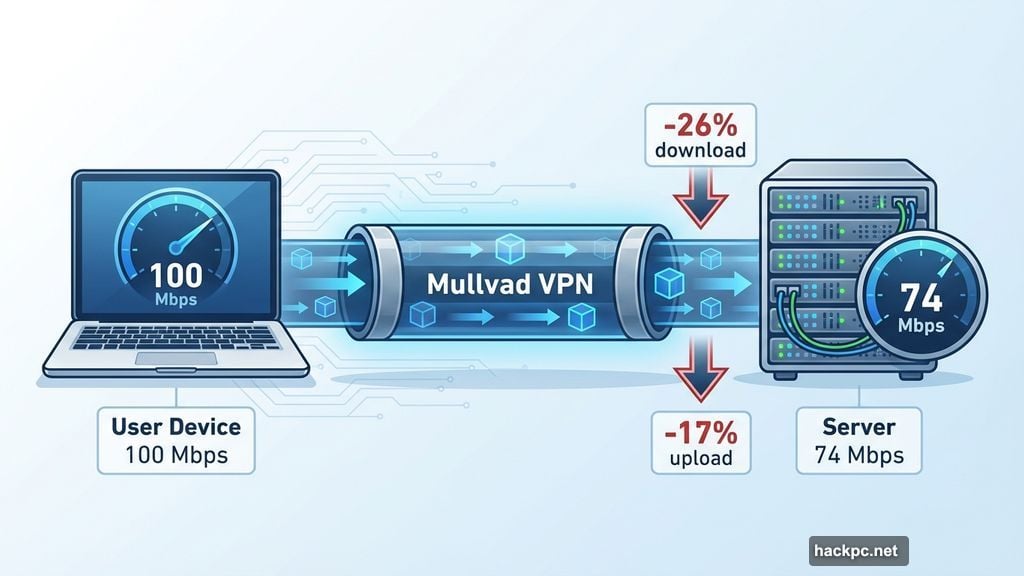
I tested six Mullvad locations using speedtest.net. The results show speeds that won’t blow you away but won’t frustrate you either.
On average, download speeds dropped 26 percent. Upload speeds declined 17 percent. That’s not terrible, but it’s not impressive either.
However, Mullvad’s speed drops follow a predictable curve. Lots of VPNs have weird performance cliffs in certain regions. Mullvad’s speeds decrease almost directly as a function of distance from the server.
That makes planning easier. Use a nearby server and you’ll get fast, private browsing. That predictability reflects Mullvad’s core mission: if anonymity is your goal, it doesn’t matter what your IP address is, just that it’s not your real one.
WireGuard-Only Approach Has Pros and Cons
Mullvad uses exclusively WireGuard on all its apps. No OpenVPN, no IKEv2, no proprietary protocols.
WireGuard is rock solid. It uses ChaCha20 for encryption and Poly1305 for authentication. Both are uncrackable with current technology. Plus, Mullvad fixed WireGuard’s one flaw: its need to save static IP addresses. The Mullvad implementation deletes those addresses after 10 minutes of inactivity.
Still, losing the ability to change protocols hurts. Switching protocols is one of the most common troubleshooting steps when a VPN connection acts weird.
I understand Mullvad’s reasoning for cutting OpenVPN (they claim the cryptography isn’t strong enough). But I don’t agree. It’s one of this provider’s few unforced errors.
Security Testing Reveals Zero Leaks
I ran Mullvad through my standard leak tests using ipleak.net. Five different servers, each time showing only the VPN server’s IP address. My real location stayed hidden.
I tested with IPv6 blocked first, then enabled it. No leaks either way. No WebRTC leaks either. Mullvad uses its own DNS servers, which stay entirely within the VPN tunnel.
The hard test came next. Many VPNs leak when switching between servers. Mullvad has a button that shuffles to another server in the same location. Perfect for testing.
It jumped seamlessly from one server to another without revealing my real location in between. That’s exactly what you want.
Finally, I used WireShark to capture packets and verify encryption. The data Mullvad sent from my computer to my ISP was completely unreadable. Standard stuff, but important to confirm.
Payment System Breaks Every VPN Convention
Most VPNs offer 17 different subscription tiers sold at three durations with auto-renewal that tricks you into forgetting you’re paying.
Mullvad costs 5 Euro per month. That’s it. No tiers, no bundles, no complexity.
It works like a parking meter. You buy time upfront. That time counts down until it expires. If you run out of money, Mullvad just stops working. No surprise charges, no auto-renewal, no hassle.
Every payment includes a 14-day money-back guarantee. Except cash payments, which makes sense.
The real magic is payment options. You can literally mail cash to Sweden using a payment token from your account dashboard. Or buy scratch-off vouchers on Amazon that can’t be linked to your VPN account.
These untraceable payment methods exist for people who need them. But you can also pay with credit cards, cryptocurrency, or bank wires. The choice is yours.
One wrinkle: Mullvad calculates prices in Euro, so exchange rates affect what you pay outside the EU. If your government’s economic policy resembles a drunk toddler, buy several months at once.
Privacy Policy Actually Delivers
Mullvad’s privacy policy is three short documents: a privacy policy, a no-logging policy, and a cookie policy.
The privacy policy lists exactly two situations where Mullvad collects data. Using financial information to process payments (anonymous if you use cash or vouchers). And using your email address to track support tickets.
That’s it. Nothing else.
The no-logging policy explains how Mullvad runs a VPN service with almost no user data. For each account, it stores a number and an expiration date. WireGuard connections add public keys and tunnel addresses, deleted within 10 minutes of your session ending.
Everything else is completely anonymized. Mullvad even jokes that its 500,000 user accounts could theoretically belong to the same person 500,000 times.
The cookie policy is shortest because Mullvad uses exactly five cookies. One saves your login status. One saves language preferences. One prevents forgery hacks. Two handle Stripe payments.
No marketing cookies. No tracking. No exceptions.
Real-World Privacy Test Proves the Point
In 2023, Swedish police raided Mullvad’s headquarters and demanded customer information. Mullvad couldn’t comply because that information didn’t exist.
Nothing beats a VPN’s privacy being tested in the wild like that. The holy grail of VPN privacy verification.
Mullvad also maintains 17 independent audits of various aspects of its service. All of its apps have been separately audited and found solid. The last full infrastructure audit was in 2024, with many targeted reviews since then.
Streaming Performance Has Minor Hiccups
I tested Mullvad on Netflix using five different locations. Out of 15 total server attempts, 13 successfully unblocked the site and changed content.
Two servers failed: one in Singapore, one in Mullvad’s hometown of Gothenburg. I also had trouble logging into Netflix while connected to Vancouver, though that server consistently worked once I got inside.
No location failed more than once. You can get good streaming performance from Mullvad. Just be willing to click the server refresh button a few times.
Privacy remains the main use case for Mullvad. But it handles streaming well enough.
Server Network Emphasizes Quality Over Quantity
Mullvad operates 590 servers across 90 locations in 50 countries. Unlike most VPNs, you can choose between individual servers, not just cities.
Every server is physically located where it claims to be. No virtual locations. That’s admirable but limits geographic coverage.
Over half the countries with servers are in Europe. Over two-thirds of cities with servers are in Europe or North America. That concentration reflects Mullvad’s refusal to use virtual servers, since real servers need actual data centers.
The good news? At least two real server locations exist on every continent. Mullvad has surprisingly robust South American coverage and two bare-metal servers in Africa, which is more than many competitors manage.
The best application of Mullvad is protecting online privacy in North America, Europe, and eastern Asia.
DAITA Protects Against AI Traffic Analysis
Mullvad’s most novel feature is DAITA: Defense against AI-guided Traffic Analysis. Certain patterns in how browsers communicate with websites can be analyzed by AI to reveal encrypted internet history.
DAITA hides those packets by filling communications with background noise so AI can’t identify what’s real. It’s laudably forward-looking.
The downside? DAITA makes browsing slower and drains your battery. Mullvad admits this openly. I recommend only using it for activities you really want to hide.
Quantum-Resistant Encryption Looks Ahead
Mullvad’s desktop apps establish quantum-proof WireGuard tunnels by default. Quantum computing isn’t yet a threat to WireGuard, but it may become dangerous in the future.
When quantum resistance is active, Mullvad encapsulates its keys using ML-KEM, the current standard mechanism. NordVPN and a few others do this too.
Anti-Censorship Tools Work Better Than Most
If government censorship blocks your internet access, Mullvad offers several features that might help. You can change your WireGuard port, randomize your port number, disguise VPN traffic as ordinary HTTPS connections, or use obfuscated Shadowsocks proxies.
These options are more complex than most VPNs offer in this area. Less user-friendly, but more likely to work.
Mullvad’s help center has a detailed page about using anti-censor settings if you’re new to getting around firewalls.
Multihop Routing Lets You Choose Both Servers
Many VPNs offer double-hop connections that route traffic through two servers instead of one. Mullvad and Surfshark go further by letting you choose both your entry and exit servers.
When you activate multihop and open the server list, you’ll pick two locations instead of one. That means you can select an entry server close to you and an exit server in any country whose location you want to spoof.
This lets you fine-tune your own performance. Way nicer than being forced into certain paths.
DNS Content Blockers Cover Six Categories
Mullvad includes six blocklists: ads, trackers, malware, gambling, adult content, and social media. These lists can’t be customized like Windscribe’s R.O.B.E.R.T. blocks, so you’re limited to turning them on and off.
Still useful for quick filtering without installing separate ad blockers.
Kill Switch and Lockdown Mode Prevent Leaks
Mullvad’s kill switch cuts internet access if the VPN tunnel fails. Standard protection against accidental leaks.
Lockdown mode is stronger. While active, you can’t get online unless you connect to a Mullvad server first. This remains true even if you turn the connection off yourself or quit the app.
Support Team Responds Fast Without Live Chat
Mullvad doesn’t offer live chat support. That’s unfortunate, though still better than chatbots that waste your time.
Instead, I sent a question via email and got a response within 24 hours. Not instant, but reasonable.
The help center makes up for the lack of live support. Instead of cramming topics into five or six categories, Mullvad gives you dropdown filters to narrow down relevant articles by device, OS, and protocol.
The articles themselves are well-written with good internal and external linking. Some run a bit long, but they’re thorough.
Clean Background With One Minor Incident
Mullvad was founded in 2009 in Sweden. Still owned and operated by its original founders. Its 16-year history has been remarkably uneventful.
The only controversy is the 2023 police raid, which only makes them look better since they couldn’t provide the requested data.
I found one leak not mentioned on Mullvad’s site. In 2023, security researchers at ZATAZ found anonymized user information (including account numbers) saved on an Internet Archive page. Mullvad contacted the Archive and got the page deleted.
Even logging into someone else’s Mullvad account wouldn’t show their browsing history. Still, Mullvad should have made a public statement about the incident. Communication matters.
Privacy Champion With Predictable Trade-Offs
Mullvad knows what it wants to be and achieves that goal brilliantly. It’s not trying to be an everything app. It does privacy and does it well.
The compromises are predictable. Speeds sit solidly in the middle of the pack. Streaming occasionally requires server hopping. The WireGuard-only approach limits troubleshooting options.
But those are minor hiccups on a VPN that does such a thorough job keeping you anonymous online. If privacy matters more to you than blazing speeds or Netflix reliability, Mullvad delivers.




Comments (0)