
Your iPhone knows a lot about you. Every app you open, every site you visit, every search you make — your mobile carrier sees all of it. A good VPN changes that fast.
But not every VPN works well on iOS. Some are clunky, some are slow, and some (especially free ones) actually make your privacy situation worse. So after extensive hands-on testing across speed, privacy, streaming, and usability, here’s what actually performed best on iPhone.
![A clean, modern illustration showing a smartphone with a shield and lock icon overlaid, representing VPN protection on mobile devices, with subtle network connection lines in the background]
Four VPNs That Passed Our iPhone Tests
Let’s start with the short version. Then we’ll dig into what makes each one tick.
Surfshark is our top pick overall. It balances strong privacy features, solid speeds, and a genuinely great iOS app — all at a price that won’t make you wince.
ExpressVPN is the best choice for beginners. Its app is the simplest to use, and it delivers top-tier privacy protections right out of the box.
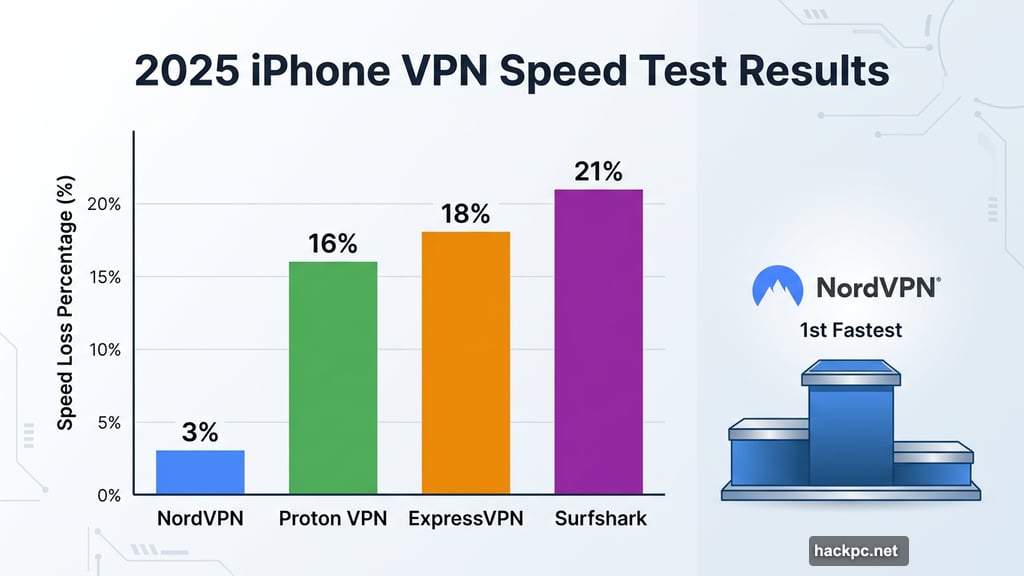
NordVPN is the fastest option, full stop. In our 2025 tests, it dropped average download speeds by just 3%. That’s extraordinary.
Proton VPN is the most flexible pick. It’s also the only free VPN we can actually recommend with a straight face.
Surfshark: Best Overall iPhone VPN
Surfshark earns its top spot by doing nearly everything well without charging a premium price for it.
The iOS app is clean and quick. You tap, it connects. Settings like protocol selection (WireGuard, OpenVPN, IKEv2), the kill switch, and the ad blocker are all just a few taps away. Nothing feels buried.
What really stands out? Split tunneling on iOS. Most VPN providers dropped this feature from their iPhone apps years ago. Surfshark kept it. That means you can send some apps through the VPN while others use your regular connection — super handy if you need your banking app to stay local while everything else routes privately.
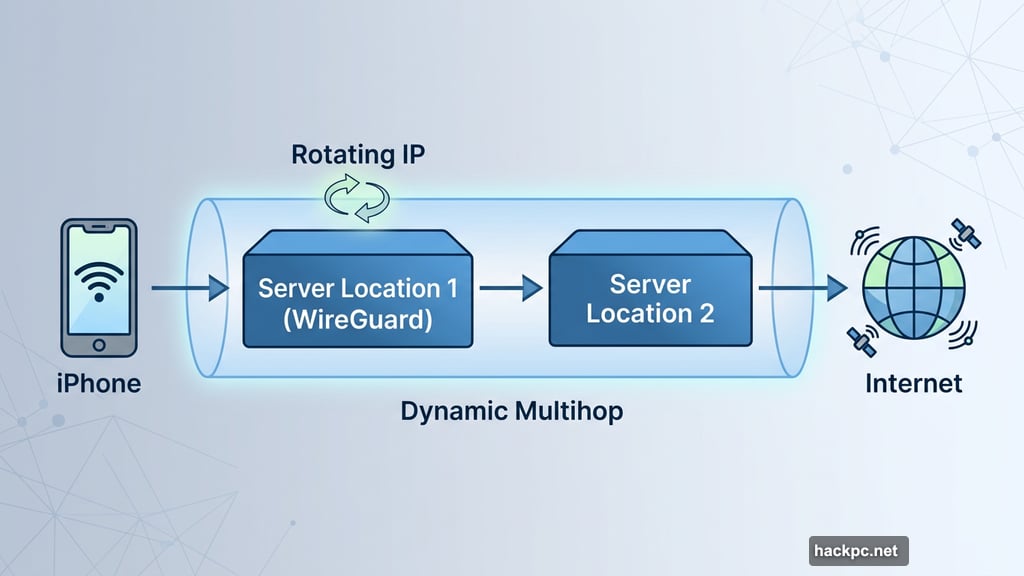
Plus, Surfshark includes some genuinely clever extras. The Rotating IP feature changes your IP address every few minutes automatically. Dynamic Multihop lets you tunnel through two server locations at once for extra privacy. And Alternative ID generates a fake name, address, and email you can use to sign up for things online without handing over your real details.
In our 2025 speed tests, Surfshark averaged a 21% speed loss. Not as fast as NordVPN, but comparable to ExpressVPN’s 18% and Proton VPN’s 16%. Fast enough for streaming, gaming, and everyday browsing without any real frustration.
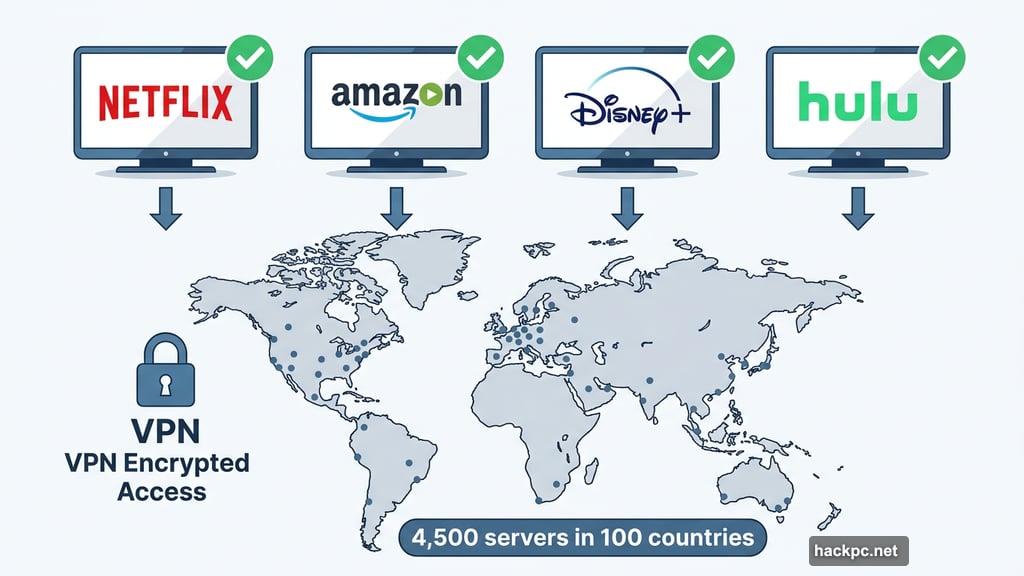
Speaking of streaming — Surfshark nailed it. Netflix, Amazon Prime Video, Disney Plus, Hulu, HBO Max all unblocked across multiple international server locations. With over 4,500 servers in 100 countries, you have a lot of options.
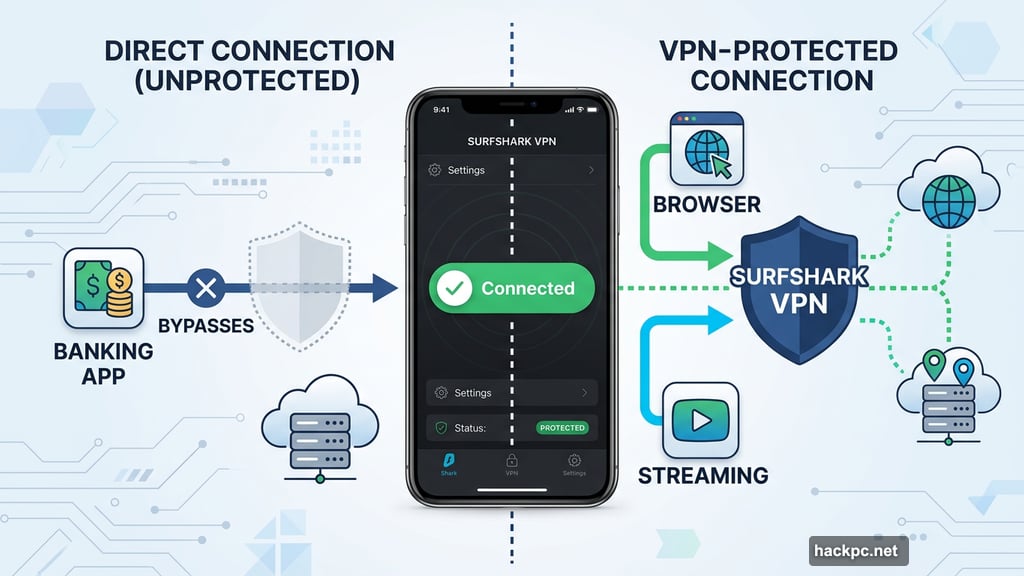
Pricing is where Surfshark really shines. The annual plan runs $48 for the first year. The two-year plan is $54 total for the first two years combined, renewing at $79 per year after that. And you get unlimited simultaneous connections — meaning your whole household can use it on every device without paying extra. Skip the $15 monthly plan, though. That’s genuinely expensive compared to rivals.
CNET Score: 8.6/10
Pros: Split tunneling on iOS, unlimited connections, great privacy features, user-friendly app
Cons: Based in Netherlands (14-Eyes jurisdiction), pricey monthly rate
ExpressVPN: Easiest VPN for iPhone Beginners
If you’ve never used a VPN before, ExpressVPN is where you should start.
The iOS app is about as simple as a VPN gets. Big connect button. Easy server browsing. Protocol options (Lightway, IKEv2, WireGuard) accessible without digging through menus. Useful tools like a DNS leak test and IP address checker are right there in the app — handy for confirming everything is working when you’re on the go.
On privacy, ExpressVPN doesn’t cut corners. Its no-logs policy is regularly audited by independent firms. The kill switch worked perfectly in our tests, with zero DNS leaks detected. And ExpressVPN has been building post-quantum protections directly into its Lightway and WireGuard protocols — future-proofing your privacy against threats from next-generation computers.
A few newer features are worth mentioning. ShuffleIP changes your IP address for every single website you visit, making tracking even harder. ExpressAI and ExpressMailGuard add extra layers for navigating the internet privately. Both run in the background without any setup on your part.
For streaming, ExpressVPN is exceptional. Our 18% average speed loss is fast enough for HD video without buffering. And in our tests, it unblocked Amazon Prime Video, Disney Plus, Hulu, Netflix, and HBO Max without issue. ExpressVPN even maintains servers in all 50 US states, making it great for travelers who want to catch regional sports or local content from home.
Here’s the catch: ExpressVPN is expensive. The monthly plan costs $13, which is competitive. But the annual plan runs $75 for the first year, and the two-year plan costs $100 total — both renewing at $100 per year. That’s significantly pricier than Surfshark or Proton VPN at renewal time. You get 10 simultaneous connections and a 30-day money-back guarantee to soften the blow.
CNET Score: 9/10
Pros: Best-in-class ease of use, excellent privacy, post-quantum protections, great for streaming, British Virgin Islands jurisdiction
Cons: Very expensive, no multi-hop connections
NordVPN: Fastest iPhone VPN by a Wide Margin
NordVPN’s speed advantage isn’t close. A 3% average speed loss in our 2025 tests is remarkable. For context, Surfshark logged 21% and ExpressVPN 18%. NordVPN is simply in a different league when it comes to raw performance.
That speed matters most for bandwidth-heavy activities. Streaming 4K video, competitive gaming on mobile, Zoom calls, fast file downloads — NordVPN handles all of it without breaking a sweat. If a slow VPN has frustrated you in the past, NordVPN is the fix.
The iPhone app is polished and intuitive. Protocol selection (OpenVPN and NordLynx — Nord’s custom WireGuard-based protocol), server selection, specialty servers, and Threat Protection are all easily accessible. The experience feels consistent whether you’re on iOS, macOS, Android, or Windows.
NordVPN’s global network includes over 8,000 servers across 126 countries, making it excellent for international travel and streaming content from virtually anywhere. In our tests, it unblocked Amazon Prime Video, Disney Plus, Netflix, and BBC iPlayer without problems.
For privacy-focused users, NordVPN goes well beyond the basics. Its proprietary NordWhisper protocol mimics standard web traffic, helping it slip past school Wi-Fi filters and networks that actively block VPN use. Specialty servers include Tor Over VPN and double-hop options for extra anonymity layers. Meshnet is a unique feature that creates a private virtual network — useful for remote LAN gaming, accessing streaming services abroad, or avoiding CAPTCHAs.
One frustrating issue: NordVPN’s pricing structure. Introductory rates are reasonable at $13 per month, $69 for the first year, or $81 for two years. But renewal jumps to $140 per year — nearly double what you paid initially. That’s a significant sting. All purchases come with a 30-day money-back guarantee.
CNET Score: 8.8/10
Pros: Blazing-fast speeds, excellent streaming, strong privacy, great global server network
Cons: Renewal pricing is very high, inconsistent pricing structure
Proton VPN: Most Versatile and Only Free VPN We Recommend
Proton VPN occupies a unique position: it’s the only free VPN that CNET recommends for any platform, iPhone included.
![Side-by-side comparison showing Proton VPN’s free and premium tier differences, with server network coverage displayed on a world map graphic]
Proton’s free tier is genuinely honest. It uses the same encryption as the paid plan, imposes no speed limits or data caps, and doesn’t sell your usage data to third parties. Most free VPNs do at least one of those bad things. Proton doesn’t.
The free plan does have real limits, though. You can’t manually pick a server, you’re restricted to servers in 10 countries, and only one device can connect at a time. That’s acceptable for casual use. But power users will want the paid plan.
And Proton’s premium tier is genuinely impressive. Over 15,300 servers in 129 countries — the largest network of any VPN on this list. Custom server group profiles let you organize your favorites. Protocol options include WireGuard and Stealth (Proton’s proprietary protocol designed to bypass VPN blocks). NetShield blocks ads and trackers. VPN Accelerator boosts speeds on long-distance connections. Kill switch and DNS leak protection are both present and independently audited.
In our 2025 speed tests, Proton logged a 16% average speed loss — solid, and faster than Surfshark. Streaming performance was outstanding. Proton unblocked nearly every service we tested, including difficult ones like Netflix Egypt libraries. Only ExpressVPN and Surfshark also managed that trick.
One caveat worth noting: Proton VPN doesn’t offer 24/7 live chat support yet. If you run into a problem at 2am, you’re waiting until business hours. That’s a real gap compared to rivals.
Proton VPN’s paid plan costs $10 per month, $36 for the first year, or $72 for the first two years, renewing at $80 per year. That’s excellent value compared to ExpressVPN and NordVPN, especially at renewal. All plans include a 30-day money-back guarantee.
CNET Score: 8/10
Pros: Only free VPN we recommend, fast speeds, excellent streaming, open-source apps, strong privacy, massive server network
Cons: No 24/7 live chat support
What to Look For When Choosing an iPhone VPN
Privacy and Encryption Standards
Every credible VPN should use AES 256-bit encryption over OpenVPN or IKEv2, or ChaCha20 encryption with WireGuard. These aren’t just technical checkboxes — they’re the foundation of actually protecting your data.
Beyond encryption, look for a verified kill switch, DNS leak protection, and a no-logs policy that’s been independently audited. A VPN that just claims it doesn’t log your activity means very little. One with published audit reports from a third-party firm means a lot more.
For users with serious privacy needs — activists, journalists, people in restrictive regions — additional features matter. Obfuscated servers hide the fact that you’re using a VPN at all. Multi-hop connections route your traffic through two servers instead of one. Tor Over VPN adds another privacy layer on top. And RAM-only server infrastructure ensures no data is ever written to disk.
Speed: How Much Slowdown Is Acceptable?
All VPNs slow down your connection somewhat. Encrypting your traffic and routing it through a remote server takes time. But the best VPNs keep that impact minimal.
Generally, a speed loss of 25% or less is acceptable for most users. In our testing, NordVPN’s 3% loss was extraordinary. Proton VPN’s 16% and ExpressVPN’s 18% are both comfortable. Surfshark’s 21% is still fine for most activities. Private Internet Access (PIA) averaged a painful 49% in our tests — hard to recommend for anyone with a slower base connection.
Streaming and Geo-Unblocking
Using a VPN on your iPhone means your IP address appears to come from wherever your VPN server is located. Connect to a UK server and Netflix shows you British content. Connect to a US server in New York and you get the US library.
Not every VPN reliably unlocks international streaming. In our tests, ExpressVPN was the most consistent performer across the widest range of services. Surfshark and Proton VPN were close behind. NordVPN excelled with Netflix, Amazon Prime Video, Disney Plus, and BBC iPlayer specifically.
Cost: What You Should Expect to Pay
Monthly VPN plans typically cost $10 to $15 per month. Annual plans range from about $36 to $100 for the first year. Multi-year bundles offer the biggest upfront savings but lock you in longer — we generally suggest annual plans as the sweet spot between savings and flexibility.
Watch out for renewal pricing. NordVPN’s renewal at $140 per year is a big jump from its introductory rate. ExpressVPN renews at $100 per year. Surfshark and Proton VPN are gentler at $79 to $80 per year on renewal.
Most free VPNs are a bad idea. They compensate for zero revenue somewhere — usually by logging your activity and selling it to data brokers, injecting ads into your browser, or both. Some contain outright malware.
Proton VPN is the exception. Its free tier uses real encryption, has no data limits, and doesn’t monetize your usage. It’s the only free option we’d actually put on our own phones.
iOS-Specific Things Worth Knowing
The iOS Traffic Leak Issue
Independent research has found that VPNs on iOS devices can sometimes leak traffic outside the VPN tunnel in an unencrypted state. This isn’t a specific VPN’s fault — it’s an Apple-side vulnerability that affects all VPNs on iOS.
Proton VPN published a workaround: connect to your VPN, enable Airplane mode to kill existing connections, then disable Airplane mode. The VPN should reconnect with all traffic properly routed through the tunnel. Proton notes this isn’t a guaranteed fix, but it helps.
Split Tunneling on iPhone
Most VPNs quietly dropped split tunneling support from their iOS apps due to Apple platform restrictions. Surfshark and IPVanish both still offer it — a genuine advantage if you want some apps running through the VPN while others use your regular connection.
Setting Up a VPN on Your iPhone
The setup is simpler than most people expect. Download your VPN provider’s app from the App Store, create an account, log in, and tap Connect. The whole process typically takes less than two minutes. To disconnect, tap the Disconnect or Off button. That’s genuinely it.
Which iPhone VPN Should You Pick?
If you want the best all-around value, Surfshark is hard to beat. Great features, unlimited connections, solid streaming, and competitive pricing.
If you’re new to VPNs and want something that just works without any confusion, ExpressVPN’s app is the most polished and beginner-friendly experience available.
If speed is your top priority for streaming or gaming, NordVPN’s 3% speed loss makes it the clear winner. Just budget for that $140 annual renewal.
And if you want to try a VPN for free before paying for anything, Proton VPN’s free tier is the only honest option in a crowded field of free VPNs that really aren’t.
Any of these four will meaningfully improve your privacy on iPhone compared to browsing without one. The differences between them are real but relatively minor compared to the gap between using a good VPN and using none at all.


Comments (0)