

Keeping every device protected online sounds simple. But with phones, laptops, smart TVs, streaming sticks, and tablets all competing for coverage, picking the right VPN gets complicated fast.
The good news? A handful of VPNs handle multi-device protection really well. We tested the top contenders across simultaneous connections, speed, privacy features, and streaming performance to find out which ones deserve your money.
Here’s what we found.
What Makes a Great Multi-Device VPN?
Before we get into specific picks, let’s talk about what actually matters when you’re covering multiple gadgets.
Simultaneous connections is the big one. Most VPNs let you run between five and ten active connections at once. Some, like Surfshark and PIA, offer unlimited. That number determines how many devices can use the VPN at the same time, not just how many you can install it on.
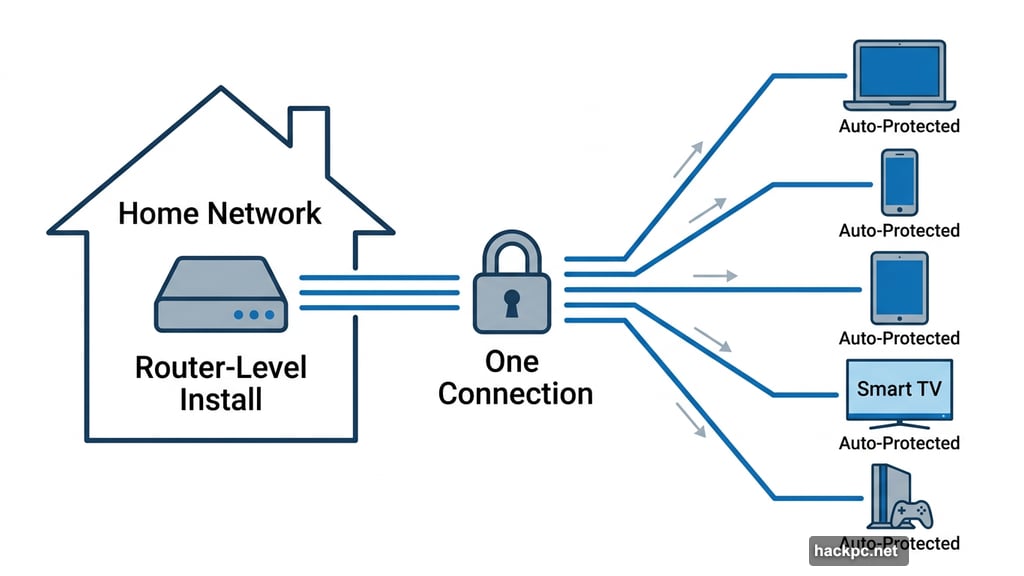
Platform compatibility matters just as much. You want apps for Windows, macOS, iOS, Android, Fire TV, Apple TV, and ideally Linux. Some VPNs also support router-level installation, which covers every device on your network with a single connection.
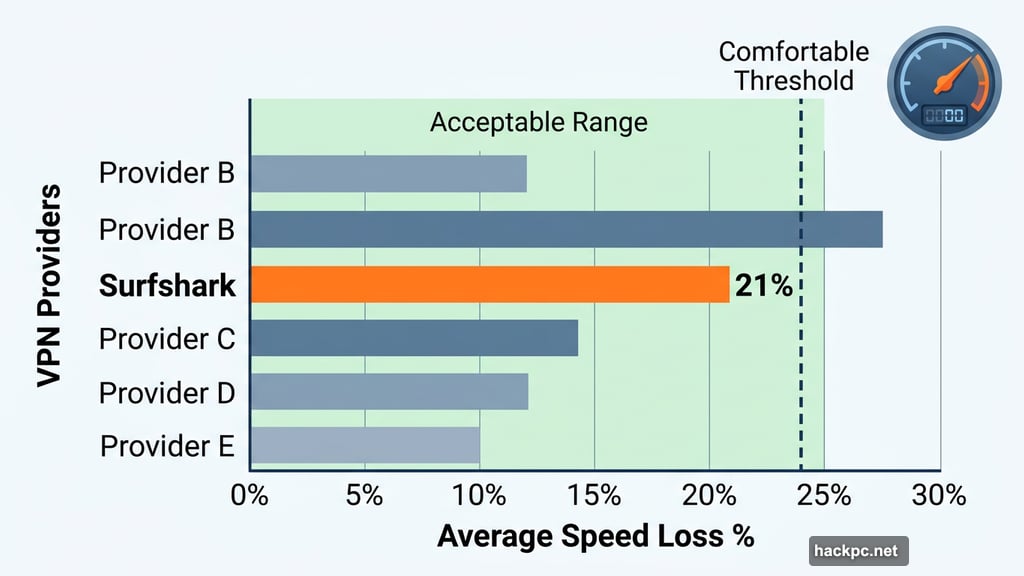
Speed loss is unavoidable with any VPN. Encryption and traffic rerouting add overhead. But the best VPNs keep average speed loss under 25%, which most people won’t notice on a solid internet connection.
Privacy essentials include a kill switch, DNS leak protection, and a verified no-logs policy. Without these basics, you’re not really protected.
Surfshark: Best Features for the Price
Surfshark sits at the top of this list for one simple reason: unlimited simultaneous connections at a price that undercuts almost everyone else.
You get apps for Windows, macOS, Linux, Android, iOS, Apple TV, Fire TV, and Android TV. Streaming performance is solid across the board, with consistent unblocking on Netflix, Disney Plus, Max, and Hulu. Speed loss averaged 21% in 2025 testing, which is slightly higher than previous years but still well within the comfortable range.
What makes Surfshark stand out beyond the basics is its roster of extra features. Dynamic Multihop routes your traffic through two server locations for added privacy. Rotating IP switches your address every few minutes. Alternative ID lets you create a fake persona — complete with a name, address, and email — to use online instead of your real details. Surfshark also recently added post-quantum encryption protections, keeping pace with ExpressVPN, Mullvad, and NordVPN.
The server network covers 3,200-plus servers across 100 countries. That’s solid, though smaller than NordVPN’s 126-country footprint or Proton VPN’s 126-country reach.
Pricing runs $15.45 per month for a monthly plan, which is steep. But the annual plan costs $48 for the first 15 months, and the two-year plan comes to $54 total for the first 27 months. Both renew at $79 per year — meaningfully cheaper than ExpressVPN’s $100 or NordVPN’s $140 annual renewal rates.
One thing to keep in mind: Surfshark is based in the Netherlands, which falls under the 14 Eyes intelligence-sharing alliance. For most users that won’t matter. But if you have serious privacy concerns, it’s worth noting.
ExpressVPN: Best for Beginners and Privacy Enthusiasts Alike
ExpressVPN scores a 9/10 on CNET’s testing scale, making it the top-rated overall VPN in this comparison. It allows up to 10 simultaneous connections, which covers most households without issue.
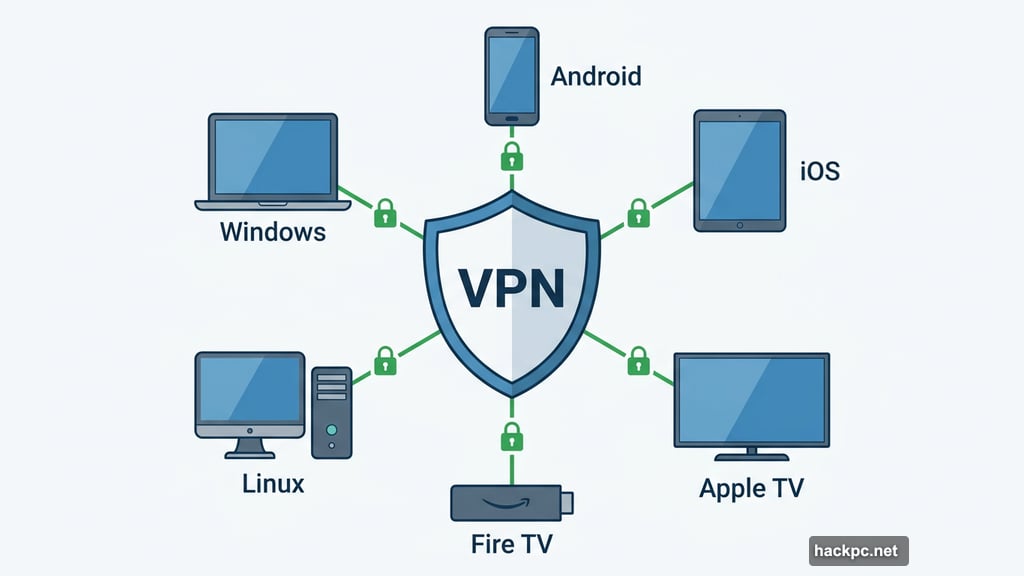
The apps are genuinely polished. Whether you’re setting up a VPN for the first time or you’ve been using them for years, ExpressVPN’s interface feels intuitive across every platform. Apps cover Windows, macOS, Android, iOS, Apple TV, Fire TV Stick, Android TV, and Linux via a GUI app.
Speed-wise, ExpressVPN delivered an 18% average speed loss in 2025 tests — a real improvement over previous rounds. The provider addressed earlier speed issues with updates to both its Lightway and OpenVPN protocols on Windows.
Privacy credentials are genuinely impressive. ExpressVPN has completed 23 independent audits since 2018. It operates from the British Virgin Islands, outside Five, Nine, and 14 Eyes jurisdictions. TrustedServer technology wipes and reinstalls the entire server stack on every reboot, not just clearing stored data. The provider also integrated ML-KEM post-quantum encryption into Lightway and added WireGuard post-quantum protections.
In July 2025, ExpressVPN expanded its server coverage to include all 50 US states. That’s great news for anyone traveling within the US or trying to access regional sports streaming like NFL games or WNBA matches.
The catch is cost. At $13 per month, $75 for the first 15 months annually, or $98 for the first 28 months on a two-year plan, ExpressVPN isn’t cheap. Both plans renew at $100 per year. If you need to cover more than 10 devices, ExpressVPN’s separately sold AirCove router handles unlimited devices on a single connection.
NordVPN: Fastest Multi-Device VPN Available
If raw speed is your priority, nothing touches NordVPN right now. It clocked an average internet download speed loss of just 3% in 2025 testing. The next closest competitor, Proton VPN, came in at 16%. That gap is enormous.
That speed makes NordVPN the obvious choice for 4K streaming, competitive gaming, and video calls. Its streaming unblocking is also excellent, handling foreign Netflix, Amazon Prime Video, Disney Plus, Max, BBC iPlayer, Hulu, CBC Gem, and Crunchyroll without drama.
NordVPN supports 10 simultaneous connections and has apps across all major platforms. Its server network of 8,000-plus servers in 126 countries gives it slightly broader global reach than Surfshark or ExpressVPN. Plus, in July 2025, NordVPN added scam call protection on Android — a useful bonus for anyone tired of spam calls.
Privacy goes beyond the basics too. NordLynx (built on WireGuard protocol) handles standard connections. NordWhisper, the provider’s proprietary obfuscation protocol, disguises VPN traffic as regular HTTPS traffic to sneak past restrictive firewalls — helpful on school Wi-Fi or in countries where VPNs are restricted. Double VPN and Onion over VPN servers add extra routing layers. Meshnet creates a virtual local network for secure file sharing or LAN gaming. A recent no-logs audit adds further peace of mind.
Here’s where it gets complicated. NordVPN starts at $13 per month, $60 for the first year, or $81 for the first two years. But the renewal price jumps to $140 per year. That’s nearly double what Surfshark or Proton VPN charge at renewal. It’s a real sting if you’re not paying attention before your subscription renews.
PIA: Best Budget VPN for Multiple Devices
Private Internet Access (PIA) is the most affordable option on this list by a significant margin. Pricing runs $12 per month, $40 for the first year (renewing at $50 annually), or $79 total for three years. And you get unlimited simultaneous connections — a feature that pricier services like ExpressVPN and NordVPN simply don’t offer.
The server network is massive at 35,000-plus servers across 91 countries. PIA also covers all 50 US states, which is useful for bypassing regional sports blackouts on services like NFL Sunday Ticket.
Open-source apps are a genuine privacy plus. Anyone can inspect the code for vulnerabilities. Split tunneling on macOS is a rare feature that PIA offers, letting you route only specific apps through the VPN. Proton VPN, for comparison, restricts split tunneling to Android and Windows.
However, PIA had a rough showing in 2025 speed tests. Average speed loss came in at 49%, well above the 25% benchmark. CAPTCHAs interfered with basic browsing tasks, and streaming required more server-switching than competitors. These aren’t dealbreakers for light use, but they’re worth knowing about before committing.
PIA is based in the US, which sits at the heart of the Five Eyes intelligence alliance. That’s the other meaningful privacy concern here.
For the price, PIA is a reasonable choice if you’re on a tight budget and need comprehensive US coverage. But if you can stretch a bit, Surfshark or Proton VPN deliver better performance for a modest premium.
Proton VPN: Best Free Option for Multiple Devices
Proton VPN holds a unique spot in this roundup. It’s the only free VPN we’d actually recommend.
The free tier doesn’t sell your data, doesn’t show ads, and doesn’t cap your monthly usage. The real limitations are that you’re restricted to one device at a time, can only connect to servers in five countries, and can’t manually pick your server. For basic privacy protection while browsing, it works fine. For multi-device coverage, you’ll want the paid plan.
Paid plans unlock 10 simultaneous connections, 15,800-plus servers in 126 countries, and the full feature set. Proton posted a 16% average speed loss in 2025 testing — second only to NordVPN — which keeps streaming smooth and buffering rare. It unblocked virtually every streaming service tested, including Netflix Egypt, which only a handful of VPNs can access.
Privacy is a genuine strength here. Proton VPN is based in Switzerland, outside the Eyes alliances entirely. Apps are fully open-source. The Android app includes a discreet icon feature that disguises Proton as a calculator, notes app, or weather app — genuinely useful for travel to countries where VPN use is frowned upon.
There is a known issue worth mentioning. Proton’s macOS app failed to properly warn users when switching servers could expose their IP address temporarily. The company has promised a fix in an upcoming update.
One other gap: no 24/7 live chat support yet, though Proton says it’s coming by end of year. If you expect to need help outside business hours, keep that in mind.
Pricing runs $10 per month, $60 for the first year, or $108 for the first two years. Both longer plans renew at $80 per year.
Simultaneous Connection and Device Compatibility at a Glance
Choosing between unlimited and 10-connection VPNs really comes down to your household setup. Here’s a quick breakdown:
All five VPNs support Windows, macOS, Android, iOS, Apple TV, Fire TV, and router installation. Linux GUI apps are available across all five as well — useful if you run a Linux machine as part of your setup.
Smart TVs running Android TV or Google TV can install VPN apps directly. Samsung Tizen, LG webOS, and Roku devices require workarounds like router-level VPN or casting from a connected device.
Router-Level VPN: Cover Every Device at Once
If you have devices that don’t support VPN apps natively — game consoles, smart home gadgets, Roku players — a router-level VPN solves the problem entirely.
By installing a VPN on your router, every device on your network runs through the VPN automatically. Better still, the router counts as a single connection against your simultaneous device limit, regardless of how many devices connect through it.
The tradeoff is complexity. Not all routers support VPN configuration, and manual setup can be technically demanding. ExpressVPN’s AirCove and AirCove Go routers handle this with minimal setup. Pre-flashed routers from FlashRouters work with most major VPN providers.
What Speeds to Realistically Expect
Speed loss varies meaningfully between providers. Here’s how 2025 testing shook out:
- NordVPN: 3% average speed loss
- ExpressVPN: 18% average speed loss
- Proton VPN: 16% average speed loss
- Surfshark: 21% average speed loss
- IPVanish: 44% average speed loss
- PIA: 49% average speed loss
For most activities — streaming HD video, video calls, general browsing — anything under 25% is effectively unnoticeable on a decent internet connection. NordVPN’s 3% loss is exceptional. PIA and IPVanish’s figures are cause for concern if you’re working with slower baseline speeds.
VPN Obfuscation: When Your Network Fights Back
Standard VPN connections are sometimes detectable and blockable. School networks, workplace firewalls, and certain countries actively try to block VPN traffic. That’s where obfuscation protocols come in.
Obfuscation disguises VPN traffic to look like regular HTTPS web traffic, making it much harder to detect and block. NordVPN’s NordWhisper is purpose-built for this. Proton VPN’s Stealth protocol serves the same function. If you need a VPN in a restrictive environment, check that your provider offers obfuscated servers or an obfuscation-capable protocol before subscribing.
Picking the Right VPN for Your Setup
For most people covering multiple devices without breaking the bank, Surfshark is the practical choice. Unlimited connections, solid speeds, great streaming unblocking, and a competitive price make it the default recommendation.
If privacy and transparency matter most to you, ExpressVPN’s 23 independent audits and British Virgin Islands jurisdiction are hard to argue with. The AirCove router extends coverage well beyond 10 devices when needed.
NordVPN is worth the premium if you’re a serious streamer or gamer. No other VPN comes close to that 3% speed loss figure, and its streaming unblocking is flawless across every major platform.
On a tight budget? PIA delivers unlimited connections and all-50-states US coverage for the lowest price in the category. Just know that speed consistency has been an issue, and the US jurisdiction is a real privacy consideration.
And if you’re not sure you want to pay at all, Proton VPN’s free tier is the only no-cost option worth trusting. For full multi-device coverage, the paid plan is genuinely competitive with the top-tier options.
Whatever you choose, the main thing is having something in place. Running multiple devices without a VPN means your ISP, the network you’re connected to, and any app tracking your IP address can see far more about your online activity than you’d probably like. A good VPN closes that gap across every device you own.




Comments (0)