
Torrenting gets a bad reputation. But downloading Linux distributions or public domain movies using BitTorrent is completely legal.
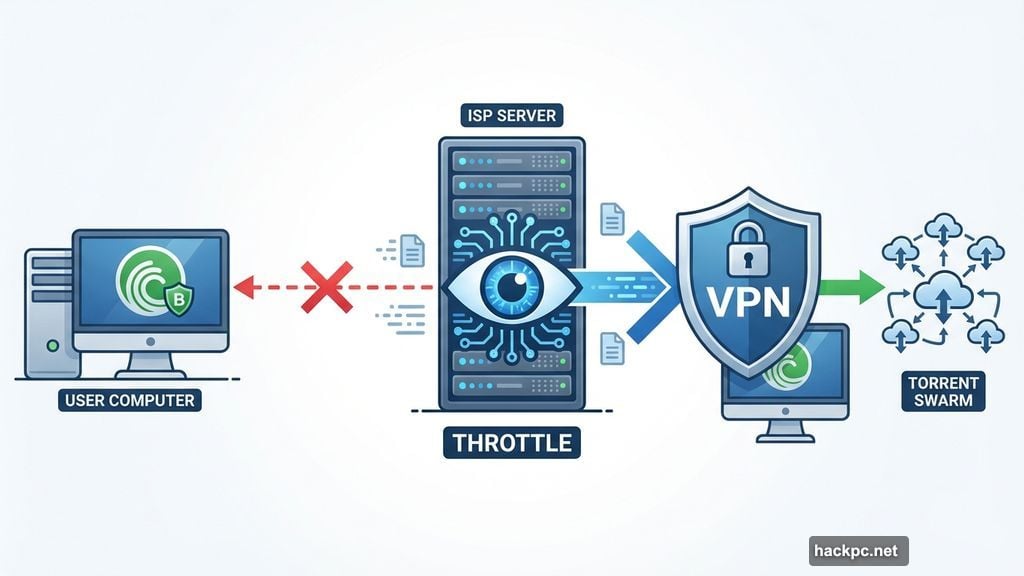
Your internet provider doesn’t care about legality. Many ISPs throttle or block all BitTorrent traffic by default. Some even log your downloading activity. So even if you’re grabbing legitimate files, you need protection.
That’s where VPNs come in. Let’s break down which ones actually work for private file sharing.
NordVPN Downloaded Files Lightning Fast
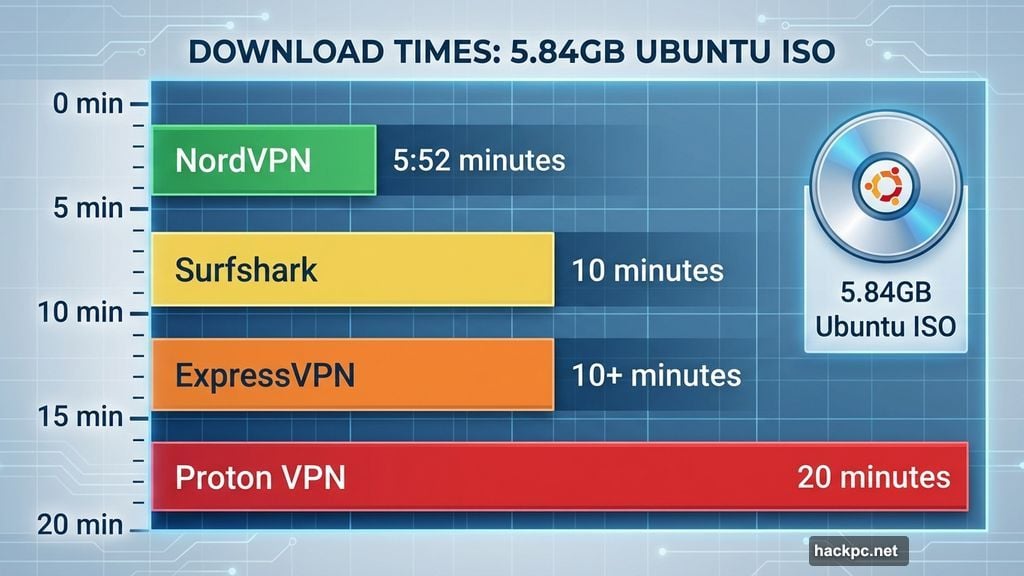
I tested NordVPN with real torrents. A 5.84GB Ubuntu installer finished in 5 minutes and 52 seconds. That’s blazing fast.
By comparison, Surfshark took nearly 10 minutes for the same file. ExpressVPN clocked in just over 10 minutes. Plus, Proton VPN needed almost 20 minutes to complete the download.
NordVPN restricts torrenting to dedicated P2P servers. But that limitation didn’t slow me down. The company offers plenty of torrent-optimized servers spread across multiple countries. Connection speeds stayed consistently fast.
However, Nord lacks port forwarding. Some torrenters swear by port forwarding for faster speeds and better access to poorly-seeded files. But in my testing, Nord downloaded everything quickly without it. So most folks won’t miss this feature.
The kill switch works perfectly. Your internet cuts off immediately if the VPN drops unexpectedly. That keeps your torrenting activity private even during connection hiccups.
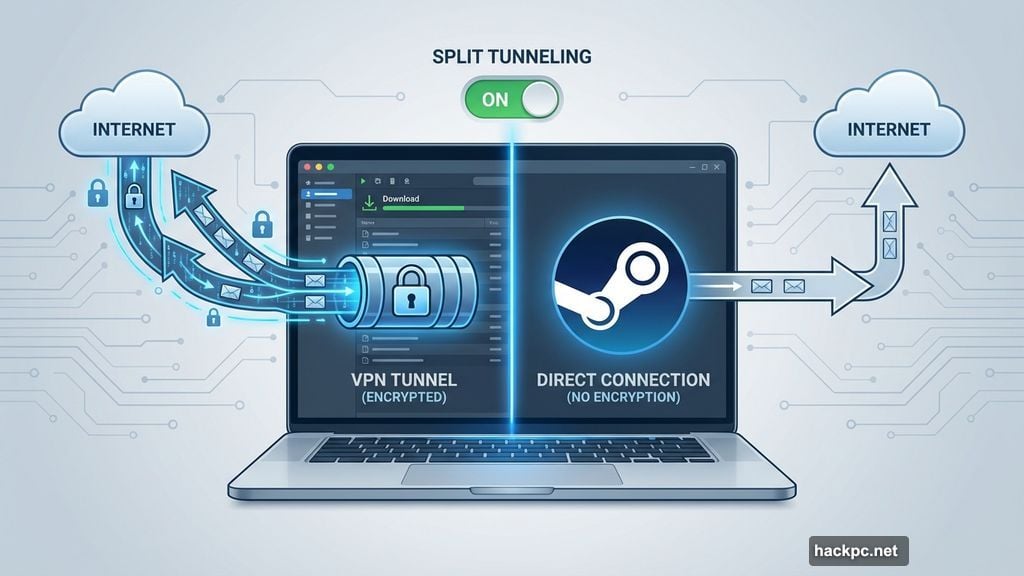
Split tunneling proved useful for my workflow. I torrented privately through the VPN while downloading Steam games outside the encrypted tunnel for maximum speed. This flexibility matters if you multitask while file sharing.
Nord costs $13 monthly, $60 yearly, or $82 for two years. But watch out for the renewal trap. After your initial term, the price jumps to $140 annually. That’s a painful increase. Stack subscriptions to avoid this predatory pricing.
Proton VPN Added Port Forwarding Others Skip
Proton VPN stands out because it offers port forwarding. Most VPN companies skip this feature entirely.
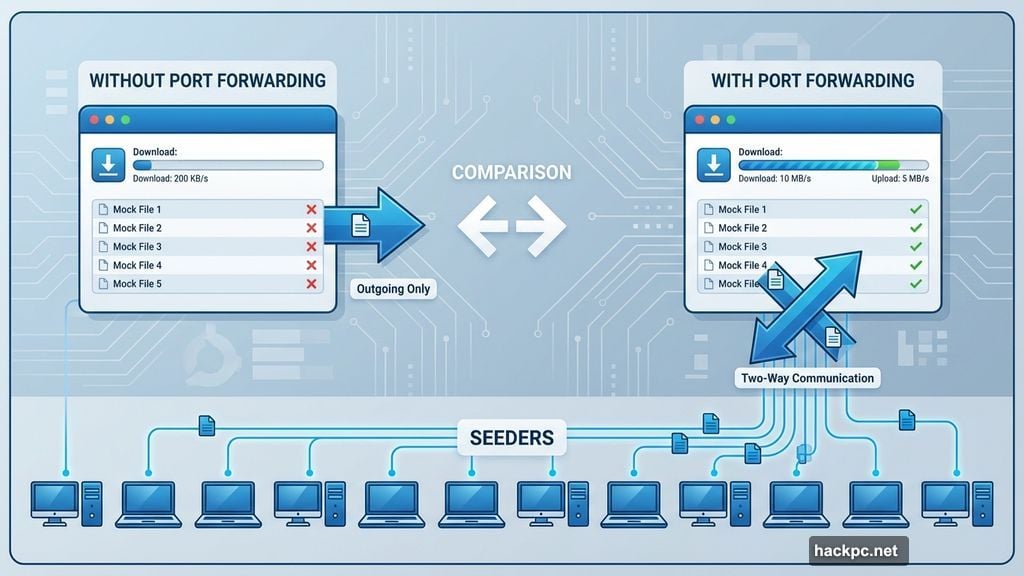
Port forwarding leaves specific ports open on your network. This allows other torrenters to connect directly to you, not just the other way around. Think of it like having a two-way street instead of a one-way road.
The benefit shows up with old or obscure torrents that have few seeders. Your torrent client can find sources more easily when connections work both ways. Plus, your uploads may speed up, which helps maintain good ratios on private trackers.
However, port forwarding introduces minor security risks. You’re essentially leaving a window unlocked. Proton claims its implementation addresses some vulnerabilities, but the risk remains.
Speed-wise, Proton delivered mixed results. The Ubuntu ISO took 19 minutes and 43 seconds to download. A Batocera Linux image needed 13 minutes and 5 seconds. Both times were slower than NordVPN.
But Proton’s port forwarding gives power users options. If you regularly torrent rare files or participate in private tracker communities, this feature matters more than raw speed.
The MacOS kill switch confused me. Switching servers didn’t clearly indicate when the encrypted tunnel broke. So if you torrent on a Mac, pause your downloads before changing servers. Otherwise, your ISP might glimpse your activity.
Windows users won’t face this issue. The kill switch worked flawlessly on Windows throughout my testing.
Proton’s apps are entirely open-source. Anyone can inspect the code for security flaws or privacy issues. Only a handful of VPNs, including Mullvad, offer fully open-source apps across all platforms.
Pricing runs $10 monthly, $60 for the first year, or $108 for two years. The annual plans renew at $80 yearly. That’s more reasonable than NordVPN’s highway robbery renewal rate.
Surfshark Costs Less Without Cutting Corners
Surfshark lets you torrent on every single server. No restrictions. No designated P2P servers to hunt down.
This flexibility matters when you’re traveling internationally or need to connect through specific countries. You won’t waste time checking if a particular server supports file sharing.
Surfshark downloaded the Ubuntu ISO in 9 minutes and 43 seconds. That’s faster than Proton but slower than Nord. The Batocera image took 17 minutes and 23 seconds, which lagged behind both competitors.
But Surfshark delivers features that pricier VPNs lack. Unlimited simultaneous connections mean you can protect every device you own. Most competitors cap you at 5 to 10 devices.
Split tunneling works on MacOS and iOS, not just Windows and Android. This cross-platform support is rare. Private Internet Access is the only other major VPN offering iOS split tunneling.
On Mac, you can route specific apps and websites through the VPN using Surfshark’s Bypasser feature. So torrent privately while streaming Netflix or gaming outside the VPN for faster speeds.
iOS Bypasser only works with websites, not apps. But most folks don’t torrent on iPhones anyway, so that’s not a dealbreaker.
Surfshark’s introductory pricing crushes the competition. Pay $48 for your first year or $60 for two years. That’s incredibly cheap for a feature-rich VPN.
The catch comes at renewal. Your price jumps to $79 annually after the promotional period ends. Still cheaper than NordVPN’s $140 renewal or ExpressVPN’s $100, but it’s an increase nonetheless.
Stack subscriptions before renewal to maintain the lower price. Or cancel and resubscribe under a new email address.
Mullvad Took Privacy to Extremes
Mullvad doesn’t ask for your email, name, username, or password. The company generates a random 16-digit account number. That’s it.
You can pay with cryptocurrency for pseudo-anonymity. Or mail cash for complete anonymity. Traditional payment methods like credit cards work too, but you’ll enter less personal information than with other VPNs.
This approach appeals to privacy-conscious torrenters who want minimal paper trails. If authorities ever compelled Mullvad to hand over user data, there’s almost nothing to hand over.
Mullvad crushed every competitor in my torrenting speed tests. The Ubuntu ISO downloaded in 3 minutes and 32 seconds. That’s 40% faster than second-place NordVPN.
A Batocera image finished in 2 minutes and 34 seconds. Again, Mullvad dominated. These speeds were stunning considering Mullvad posted the slowest results in our general internet speed benchmarking.
But Mullvad’s limitations hurt its all-around value. The server network includes just 587 servers across 50 countries. NordVPN, Proton, Surfshark and ExpressVPN all offer thousands of servers in 100-plus countries.
Streaming performance disappointed. Mullvad struggled with Netflix and other popular services. So if you want one VPN for torrenting and streaming, look elsewhere.
The simultaneous connection limit is stingy. You get five devices maximum. Families or folks with lots of gadgets need more flexibility. Surfshark offers unlimited connections, while Nord, Proton and ExpressVPN provide at least 10.
Pricing is refreshingly honest. Mullvad charges 5 euros (about $6) monthly regardless of subscription length. No sneaky renewal increases. Pay for one month or three years and the rate stays identical.
That transparency matters. Most VPNs lure you in with low introductory rates, then jack up prices at renewal.
ExpressVPN Worked Fine But Cost Too Much
ExpressVPN allows torrenting on every server. No dedicated P2P servers to search for.
I downloaded the Ubuntu ISO in 10 minutes and 24 seconds. Batocera finished in 6 minutes and 43 seconds. Both times were respectable but slower than NordVPN and Mullvad.
The apps are polished and beginner-friendly. ExpressVPN consistently delivers excellent user experience across platforms. Plus, its streaming unblocking capabilities are top-notch.
But the pricing kills ExpressVPN’s value for torrenting. You’ll pay $13 monthly, $75 for a year, or $98 total for two years. The annual plans renew at $100.
That’s cheaper than NordVPN’s absurd $140 renewal. However, ExpressVPN’s starting price exceeds nearly all competitors. Surfshark costs $48 for the first year. NordVPN and Proton charge $60 initially. Mullvad stays at a flat $6 monthly forever.
So unless you desperately need ExpressVPN’s streaming prowess or prefer its interface, better options exist for torrenting specifically.
Private Internet Access Drowned in CAPTCHAs
Private Internet Access delivered frustratingly slow speeds in my benchmarking. The VPN averaged 48% internet download speed loss.
Compare that to our top picks. NordVPN posted just 3% speed loss. Proton VPN came in at 16%. Surfshark hit 21%. Even Mullvad only dropped speeds by 24%.
Oddly, PIA’s torrenting performance outpaced its general speed tests. The Ubuntu download finished in 10 minutes and 43 seconds. Batocera completed in 6 minutes and 34 seconds. Those times were competitive.
But inconsistency plagued my experience. Some servers were fast, others crawled. Plus, I encountered endless CAPTCHAs when trying to search Google or access websites.
That’s a dealbreaker. Nobody wants to prove they’re human every five minutes just to browse the internet.
If you need a cheap VPN, choose Surfshark or Mullvad instead. Both cost less than PIA’s renewal rate while delivering better performance and fewer headaches.
Free VPNs Are Terrible for Torrenting
Don’t use free VPNs for torrenting. Most free services actively block BitTorrent traffic. Those that allow file sharing impose strict bandwidth caps or throttle speeds to unusable levels.
Free VPNs often log your activity and sell data to advertisers. That defeats the entire purpose of using a VPN for privacy.
Even Proton’s free plan, which is the best free VPN we’ve tested, doesn’t support torrenting. The company reserves P2P traffic for paying subscribers only.
Just pay for a decent VPN. Mullvad costs $6 monthly with zero strings attached. Surfshark runs $48 for your first year. These prices are negligible compared to the privacy risks of free services.
WireGuard Beat OpenVPN for Speed
Use WireGuard or equivalent protocols for fastest torrenting speeds. NordVPN calls their implementation NordLynx. ExpressVPN brands theirs as Lightway.
WireGuard consistently outperformed OpenVPN in my tests. Downloads finished faster, uploads maintained better speeds, and overall latency dropped.
However, switch to OpenVPN if you need obfuscation. Some networks detect and block VPN traffic. Obfuscation disguises your VPN connection to look like regular HTTPS traffic.
NordVPN offers a proprietary obfuscation protocol called NordWhisper. Proton VPN provides Stealth mode. Both work well if WireGuard gets blocked on your network.
But for home use with a standard ISP, stick with WireGuard. The speed advantage is substantial.
Split Tunneling Changed My Workflow
Split tunneling lets you route some apps through the VPN while excluding others. This feature transformed how I torrent.
I configured qBittorrent to tunnel through the encrypted VPN connection. Meanwhile, Steam, Discord and my web browser connected directly to the internet without VPN overhead.
This setup kept my torrenting private while maximizing download speeds for games and video streams. Plus, I avoided getting blocked by anti-VPN measures on some websites.
NordVPN, Surfshark, Proton VPN and ExpressVPN all offer split tunneling on Windows and Android. But support varies on other platforms.
Surfshark stands out by providing split tunneling on MacOS and iOS. Most competitors skip Apple’s mobile platform entirely for this feature.
Just remember to add your torrent client to the VPN tunnel. Otherwise, you’ll accidentally expose your file-sharing activity.
Check Your Kill Switch Actually Works
Kill switches cut your internet if the VPN disconnects unexpectedly. This prevents your torrent client from revealing your real IP address during connection drops.
I tested kill switches on every VPN. Most worked flawlessly on Windows. MacOS proved more problematic.
Proton VPN’s Mac kill switch failed to clearly indicate when the encrypted tunnel broke during server switches. So pause your downloads before changing servers on Apple computers.
Nord, Surfshark and Mullvad all handled Mac kill switches properly in my testing.
To verify your kill switch works, deliberately disconnect from the VPN while torrenting. Your download should stop immediately. Check your torrent client’s connection status to confirm no data leaked.
If downloads continue after disconnecting, your kill switch isn’t protecting you. Contact support or switch VPNs.
RAM-Only Servers Don’t Matter Much
Some VPN companies tout “RAM-only servers” as a major privacy feature. The theory sounds good. Nothing gets written to hard drives, so no data persists after servers reboot.
But traditional hard drive-based servers with full-disk encryption provide equivalent security. The encrypted data is inaccessible without decryption keys regardless of storage medium.
Plus, RAM-only servers don’t prevent logging at the application level. If a VPN company wants to track your activity, they can do so before data ever touches storage.
So don’t prioritize RAM-only infrastructure when choosing a torrenting VPN. Focus on transparent logging policies, independent audits and strong encryption instead.
Most Folks Don’t Need Port Forwarding
Port forwarding opens specific ports on your network to allow incoming connections. Some torrenters claim this speeds up downloads and improves access to poorly-seeded files.
In my testing, port forwarding made minimal difference. NordVPN and Surfshark lack the feature entirely, yet both downloaded files quickly. Mullvad doesn’t support port forwarding either, and it posted the fastest torrent speeds I measured.
Proton VPN offers port forwarding. But downloads were actually slower than competitors without it.
Port forwarding introduces minor security risks by leaving network ports accessible. Most users should skip this feature unless they torrent rare files or maintain ratios on private trackers.
If you absolutely need port forwarding, Proton VPN is your only solid option among our top picks. But understand that you’re accepting additional security surface area for questionable speed gains.
Stack Subscriptions to Avoid Price Hikes
VPN companies love luring customers with low introductory prices, then crushing them with renewal increases.
NordVPN charges $60 for your first year. Then renewal jumps to $140 annually. That’s a 133% increase.
ExpressVPN starts at $75 yearly, renewing at $100. Proton VPN begins at $60, climbing to $80 at renewal.
Only Mullvad maintains honest pricing. You pay $6 monthly forever, regardless of subscription length.
Here’s how to avoid price hikes on other services. Before your renewal date, purchase another subscription using a different email address. Many VPNs let you stack subscriptions, keeping the lower promotional rate.
Or cancel your existing subscription and immediately resubscribe. You’ll often receive the new customer discount again.
This takes minimal effort and saves hundreds of dollars over several years.
Torrenting remains perfectly legal for public domain content, open-source software and other freely distributable files. But ISPs increasingly throttle or block all BitTorrent traffic without distinguishing between legal and illegal uses.
VPNs protect your privacy and maintain full-speed downloading. NordVPN delivers the best overall torrenting experience with blazing speeds and robust P2P server options. Proton VPN suits power users who need port forwarding. Surfshark provides incredible value with unlimited connections and cross-platform split tunneling.
Choose based on your specific needs. But definitely use a VPN when torrenting. Your ISP doesn’t deserve to monitor your file-sharing activity.




Comments (0)