

Translation software changed everything in 2025. Yet picking the right platform remains surprisingly tricky.
Most businesses now need multilingual support. Whether you’re localizing websites, translating documents, or managing global teams, the right software matters more than ever. But with dozens of platforms claiming to be “the best,” how do you actually choose?
Here’s what actually works based on real-world testing across five continents.
GlobalLink Dominates Enterprise Translation
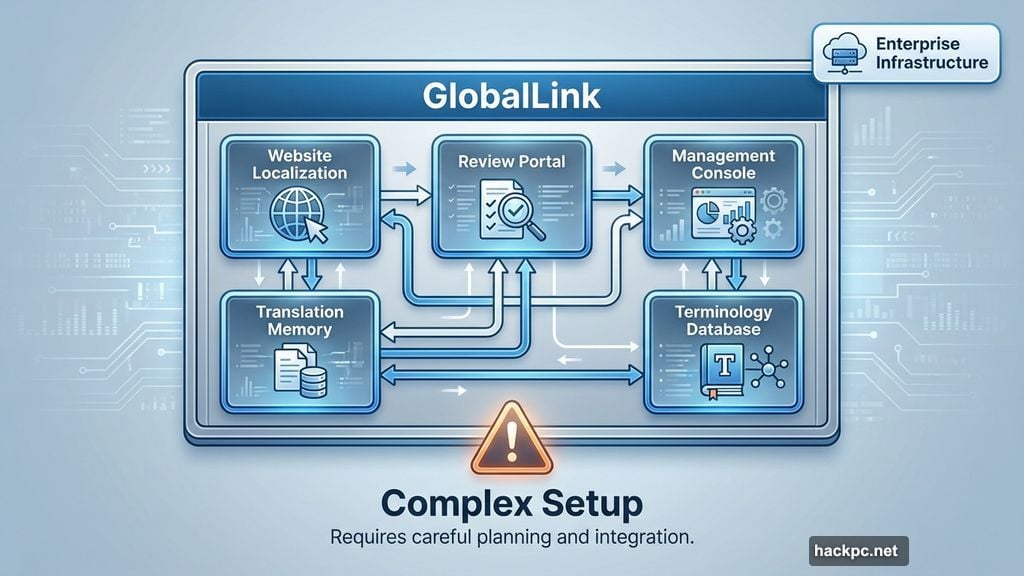
GlobalLink builds enterprise-level translation infrastructure. Not just simple text conversion.
The platform offers multiple specialized applications. Each one tackles a specific globalization challenge. You get website localization tools, translation memory systems, and review portals. Plus a management console that maintains consistent messaging across languages.
However, here’s the catch. GlobalLink’s power comes with complexity. The system works as separate applications that can function independently or connect together. So smaller teams might find the setup overwhelming.
Still, if you’re planning long-term global expansion, GlobalLink delivers the depth you need. The fragmented nature becomes an asset once you scale past initial implementation.
Text United Balances Quality and Usability
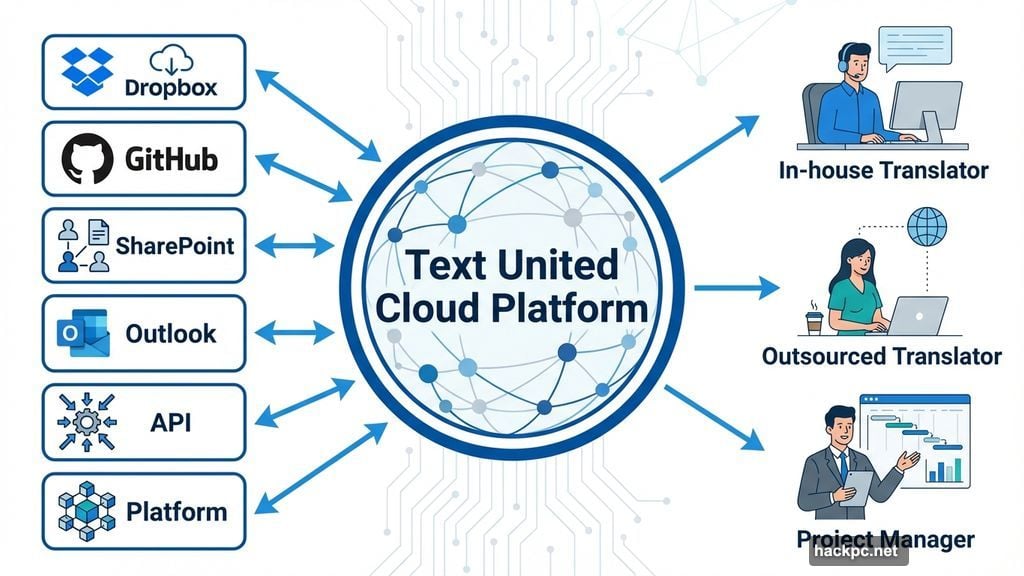
Text United nails the user experience. Their cloud platform combines outsourced and in-house translators seamlessly.
The interface feels modern and intuitive. You won’t waste hours figuring out basic functions. Instead, the platform pushes you straight into project work.
Moreover, Text United integrates with tools you already use. Dropbox, GitHub, SharePoint, and Outlook all connect directly. That means less switching between applications and more actual translation work.
Even basic plans include translation memory, terminology management, and multilingual SEO support. Plus the overlay editor makes website localization far simpler than traditional methods. Advanced tiers add API support and platform integration for larger operations.
Geoworkz Serves Freelancers Through Enterprises
Geoworkz positions itself across the entire market. Freelancers, agencies, and enterprises all get dedicated features.
The Translation Workspace provides live asset updates. Everyone sees changes instantly. Plus project management tools like asset aliasing protect client security by controlling access granularly.
But the interface feels dated. Compared to Text United’s sleek design, Geoworkz looks and feels clunky. So test the free trial before committing money.
The platform shines in collaboration features. Live online reviews let teams comment on projects in real time. Plus integration with GeoWorkz Marketplace connects you to multilingual experts when needed.
Pricing scales based on monthly word count. Separate tiers exist for freelancers, agencies, and enterprises. So you pay only for the capacity you actually need.
Pairaphrase Handles Audio and Visual Content
Most translation platforms focus on text. Pairaphrase goes further.
The service processes 24 different file types. PowerPoint presentations, AutoCAD drawings, Excel spreadsheets, and even scanned documents all translate smoothly. Plus batch uploading lets you process multiple files simultaneously.
Voice-over translation sets Pairaphrase apart. Upload a script file and receive translated audio as MP3 or WAV files in 18 languages. That feature proves invaluable for video content and presentations.
The platform covers 60 languages total. So most global markets get solid support. Microsoft Office plugins let you translate directly within Word and other Office products without switching applications.
Real-time collaboration tools round out the package. Teams work together regardless of location. However, Pairaphrase lacks the deeper localization tools that GlobalLink or Text United provide.
Phrase Specializes in Software Localization
Phrase tackles the complex world of software localization. Not just translating words, but adapting entire applications for different markets.
API-driven software extracts language data from source code automatically. Then translators work through an online editor to localize everything. The dashboard shows real-time project status at a glance.
Notifications keep everyone updated. Email alerts, in-app messages, or Slack integration ensure you never miss important changes. Plus the search function finds all instances of specific words for quick batch edits.
Advanced features include glossary support, in-context editing, and automated translation suggestions. The proof reading workflow lets team members verify translations efficiently.
Entry-level plans work for small teams testing the service. Higher tiers unlock unlimited projects and more sophisticated collaboration tools. So Phrase scales with your localization needs.

Accuracy Versus Cost Drives Your Decision
Every translation platform makes tradeoffs. Understanding those tradeoffs helps you choose wisely.
Cheaper automated options produce more errors. You’ll spend time correcting mistakes. But costs stay low for simple projects. Meanwhile, expensive human-focused services deliver higher accuracy. Yet they drain budgets faster.
So define your priorities first. Does a slightly imperfect translation work for internal documents? Then automation saves money. Are you translating legal contracts or marketing copy? Then human review becomes essential.
Test different platforms with your actual content. Marketing fluff translates differently than technical documentation. What works for one content type might fail miserably for another.
Translation software matured dramatically thanks to AI and machine learning. Nuances of language get captured better than ever before. Still, human oversight remains crucial for complex work. The sweet spot lies in platforms that blend automation with human review intelligently.
Choose based on your specific needs, not generic “best of” rankings. What works for enterprises drowns freelancers in unnecessary features. What satisfies freelancers leaves enterprises wanting essential tools.




Comments (0)