

Your Zoom meetings might not be as private as you think. Security researchers just exposed a massive malware campaign targeting Zoom users through seemingly harmless browser extensions.
The threat is real and widespread. In fact, these malicious extensions were downloaded 2.2 million times before anyone caught on. So if you’ve installed any Zoom-related browser tools recently, you need to read this.
What Zoom Stealer Actually Does
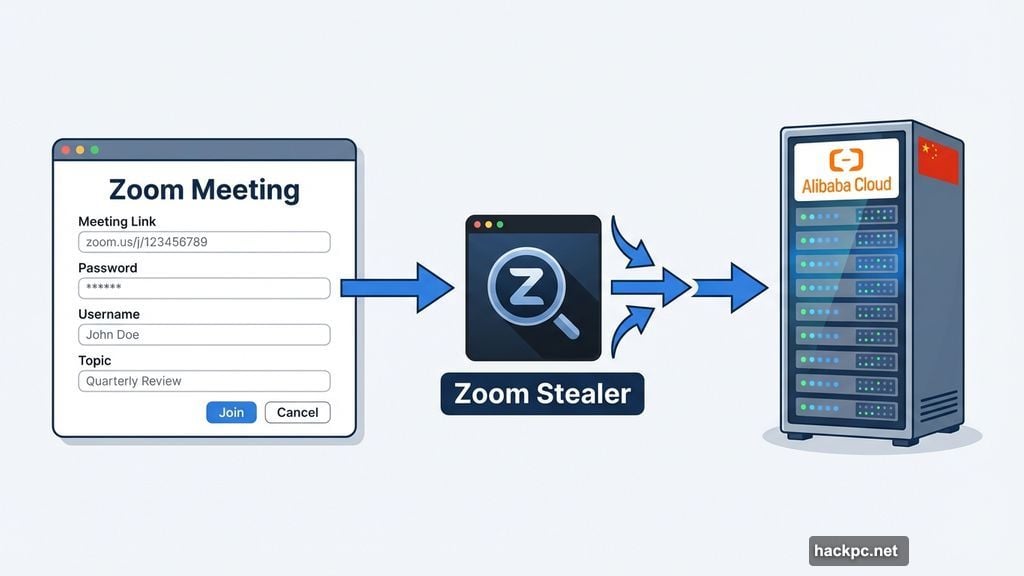
The malware campaign, dubbed “Zoom Stealer,” uses fake browser extensions to harvest sensitive meeting information. We’re not talking about minor data collection here.
These extensions steal passwords, usernames, meeting links, topics, and full meeting descriptions. Basically, everything that makes your Zoom meetings private gets exposed. Plus, the attackers designed these tools to look completely legitimate.
Security firm Koi Security discovered 18 malicious extensions across Chrome, Firefox, and Microsoft Edge. Each one masquerades as a helpful productivity tool. Video downloaders, meeting timers, and recording assistants all served as cover for data theft.
The Extensions You Need to Remove Now
Two specific extensions have been publicly identified so far. Twitter X Video Downloader was the first malicious extension discovered. Chrome Audio Capture also made the list of confirmed threats.
But here’s the problem. Researchers identified 18 total malicious extensions, and they haven’t published the complete list yet. That means other dangerous extensions are still lurking in browser stores.
The common thread? Most claim to enhance Zoom functionality in some way. They promise features like easier video downloads, better meeting management, or enhanced recording capabilities. Instead, they silently collect your sensitive meeting data.
Chinese Hacker Group Behind the Campaign
Koi Security attributes Zoom Stealer to DarkSpectre, a Chinese hacker group. The evidence is pretty clear.

First, the malware code contains Chinese language references. Second, all stolen data routes through Alibaba Cloud, a Chinese cloud service provider. These details point strongly to Chinese origins.
Yet the attackers distributed their extensions globally. The 2.2 million downloads came from users worldwide, not just one region. So this isn’t a targeted attack on specific organizations. It’s a massive data collection operation.
Why This Malware Works So Well
The extensions succeed because they actually provide useful features. A video downloader really does download videos. A meeting timer genuinely times your meetings.
This dual functionality makes detection incredibly difficult. Users get the tools they wanted, so they don’t suspect anything wrong. Meanwhile, the malware quietly collects meeting data in the background.
Moreover, these extensions requested reasonable-sounding permissions during installation. “Access your Zoom meetings to provide better features” sounds perfectly legitimate. Most users clicked “Allow” without hesitation.
How to Protect Your Zoom Meetings
Start by reviewing every browser extension you’ve installed. Look specifically for anything Zoom-related that you added in recent months.
Remove extensions you don’t actively use. Even legitimate extensions can become security risks if developers sell them to malicious actors. So the fewer extensions installed, the better.
Before installing new extensions, check reviews carefully. Look for patterns in negative reviews. Multiple users reporting “strange behavior” or “unexpected permissions” serve as red flags. Skip any extension with these warnings.
Also, limit meeting information visibility. Don’t put sensitive details in meeting titles or descriptions. Use waiting rooms to control who joins. Enable passwords for all meetings. These basic security practices reduce what attackers can steal.
The Bigger Extension Security Problem
Zoom Stealer highlights a fundamental browser extension vulnerability. Extension stores rely heavily on automated security checks. Malicious developers easily bypass these automated systems.
Chrome Web Store, Firefox Add-ons, and Microsoft Edge Add-ons all struggle with malware detection. They remove malicious extensions after researchers report them. But by then, millions of users already installed the compromised tools.
Browser makers need better vetting processes. Manual security reviews for popular extensions would catch obvious threats. Right now, attackers exploit the trust users place in official extension stores.
What Happens to Stolen Meeting Data
Where does all this stolen Zoom data actually go? That’s the scary part nobody talks about.
Meeting credentials get sold on dark web marketplaces. Corporate meeting details become corporate espionage tools. Personal information enables identity theft and targeted phishing attacks.
Some stolen data probably serves Chinese intelligence interests. DarkSpectre’s connection to Alibaba Cloud suggests state involvement. However, proving direct government links remains difficult without classified intelligence.
The stolen information has lasting value. A meeting link from six months ago might still work if nobody changed passwords. Topics and descriptions reveal organizational structure and business strategies. Even seemingly minor data becomes useful when combined with other stolen information.
Check Your Browser Extensions Today
Don’t wait until you notice something wrong. Review your installed extensions right now.
Open your browser’s extension management page. Uninstall anything you don’t recognize or no longer use. Pay special attention to Zoom-related tools you installed this year.
Your meeting privacy depends on vigilance. Extension stores won’t protect you. Browser security features won’t stop social engineering. Only careful attention to what you install keeps your data safe.
The 2.2 million people who installed these malicious extensions probably thought they were being productive. Instead, they handed over sensitive meeting information to hackers. Don’t become victim number 2.2 million and one.




Comments (0)