
AVG has been around long enough to earn a reputation. It’s one of the most recognized names in free antivirus software, and for good reason. But does “recognized” mean “recommended”? That’s a trickier question.
After spending several days testing AVG’s full suite of tools, including its antivirus, TuneUp optimizer, AntiTrack, Safe Browser, and VPN, the picture that emerges is one of genuine strengths sitting alongside some frustrating gaps. This is a product that works well for some people and falls noticeably short for others.
Let’s talk through what you actually need to know.
AVG’s Plans and Pricing: What You Get at Each Tier
AVG offers four main options, ranging from completely free to a fairly comprehensive bundle.
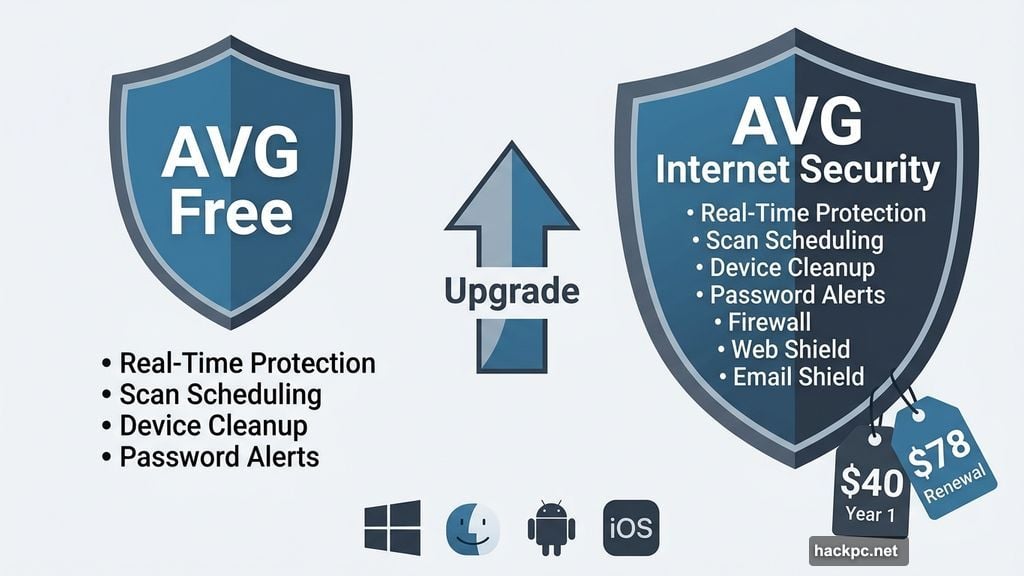
The free tier gives you real-time antivirus protection, scan scheduling, basic device cleanup tools, and password exposure alerts. It’s technically limited to one device, but you don’t need an account to install it, which means it’s flexible enough to run on multiple machines if you’re comfortable with that. It works on Windows, MacOS, Android, and iOS.
AVG Internet Security adds a firewall, Web Shield for blocking malicious URLs, and Email Shield for filtering suspicious attachments. The single-device version costs $40 in the first year, then jumps to $78 annually. For 10 devices, you’re looking at $60 the first year and $100 per year after that.
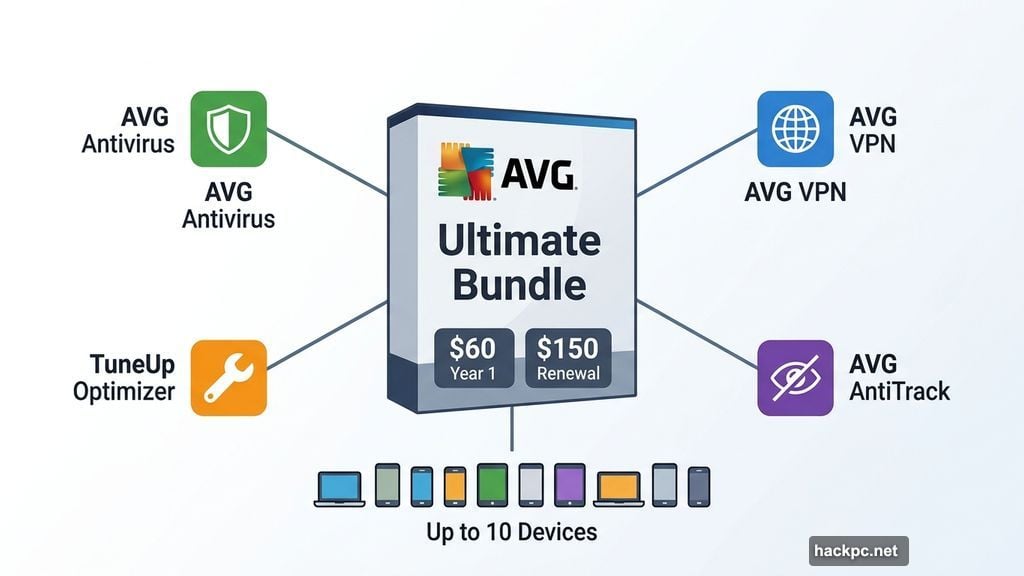
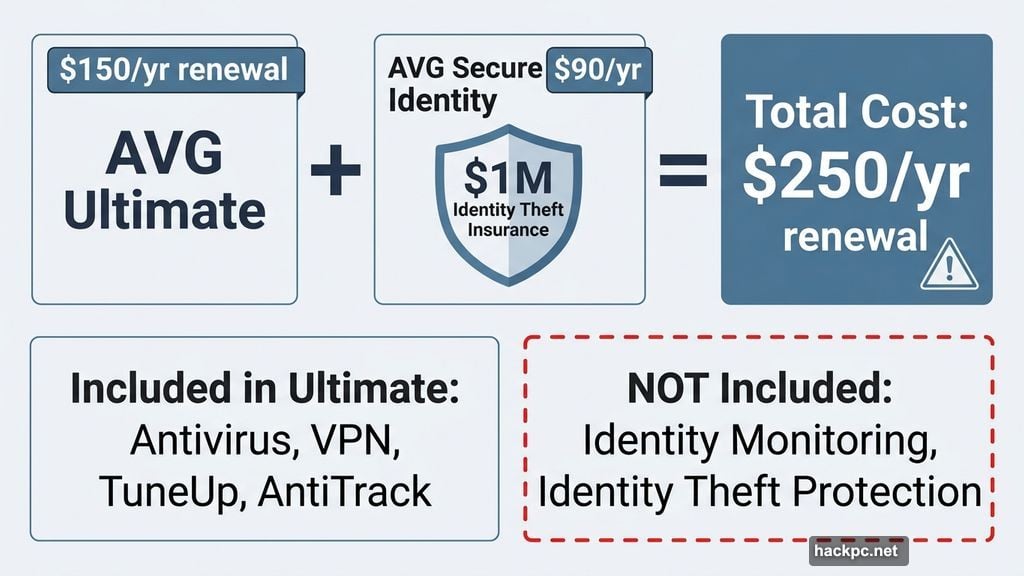
AVG Ultimate is the top bundle. For $60 in year one (then $150 annually), you get antivirus, a VPN, the TuneUp performance optimizer, and AVG AntiTrack for blocking ad trackers. That price covers up to 10 devices.
One notable gap across all plans: identity monitoring and identity theft protection aren’t included. AVG does offer a separate product called AVG Secure Identity, which includes up to $1 million in identity theft insurance, but it starts at $90 for the first year. That means buying it alongside Ultimate pushes your renewal cost to $250 per year, which puts you firmly in premium territory.
AVG Antivirus Performance: Middle of the Pack
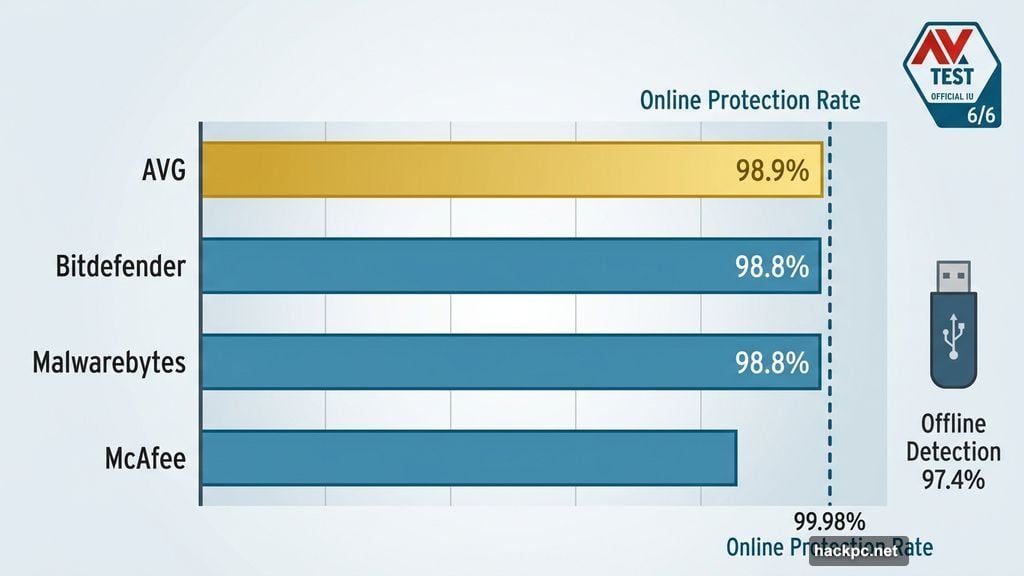
AVG’s antivirus engine consistently earns strong marks from independent testing labs. AV-Test has given it a perfect 6 out of 6 security score every year since 2022. In September 2025, AVG posted a 98.9% online malware detection rate, edging out both Bitdefender and Malwarebytes, which both came in at 98.8%.
Its online protection rate reached 99.98%, just below Bitdefender’s 99.99% but ahead of Malwarebytes’ 99.88%. Offline detection, which covers threats on USB drives and similar devices, sits at 97.4%. That’s lower than the online rates, but it’s still better than Malwarebytes’ 94.7% offline rate and comfortably above McAfee’s sub-90% offline performance.
So the detection numbers are genuinely good. Where AVG loses ground is resource usage during active scans.
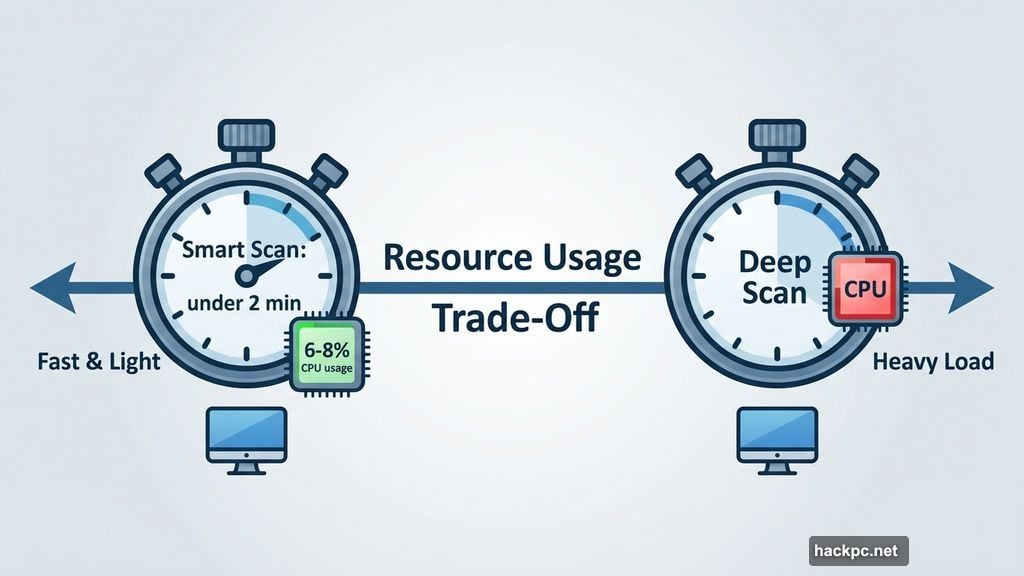
Smart scans finished in under 2 minutes and used only 6% to 8% of CPU power. Fast and light. Deep scans are where things get heavier. CPU usage during deep scans ranged from 7% all the way up to 40%, which is considerably more intensive than Bitdefender’s 7% to 10% range or Malwarebytes’ 3% to 6% range. AVG’s first deep scan completed in about 8 minutes, faster than Bitdefender and Malwarebytes’ 20- to 30-minute initial scans. But Bitdefender’s follow-up scans drop to under 3 minutes, while AVG’s subsequent scans stayed around 8 minutes.
The trade-off is clear: AVG gets through that first scan quickly by using more processing power. Bitdefender takes longer initially but becomes dramatically faster afterward. For older or lower-powered computers, that distinction matters a lot.
Background resource usage was reasonable during everyday tasks. AVG used between 0% and 3% of CPU power while idle, and between 100MB and 200MB of memory. That’s in line with most major antivirus tools.
AVG TuneUp and AntiTrack: The Tools Worth Talking About
Here’s where AVG genuinely stands out from most of its competitors.
TuneUp is a comprehensive device optimization suite that most antivirus companies simply don’t offer. It scans for junk files, browser clutter, unnecessary startup processes, and outdated software, then walks you through fixing each issue with clear, simple controls. A separate disk optimization scan digs deeper to find corrupted files. There’s also a data recovery tool that found 23.4GB of recoverable files on a relatively clean test machine, which suggests it would find even more on a heavily used personal computer.
The Data Shredder feature overwrites sensitive files before deletion, making it impossible to recover them even with advanced tools. That’s a genuinely useful privacy feature that goes beyond what most antivirus suites offer.
AntiTrack connects directly to Chrome, Firefox, Edge, and Safari to block ad trackers and other spyware in real time. During testing, it blocked something on nearly every new page load. It also includes a browser cleanup tool that clears cookies, cache, and history across all four supported browsers, plus system-level privacy settings to prevent your operating system and apps from collecting data.
Both tools are easy to use, quick to set up, and effective. If device performance and tracker blocking are priorities for you, these tools add real value.
AVG Safe Browser: More Useful Than Expected
AVG Safe Browser is a full-featured browser with a solid set of privacy tools built right in. You get a privacy guard that blocks ads and trackers at adjustable intensity levels, a web shield for blocking malicious sites, an extension guard for filtering untrustworthy browser add-ons, and a privacy cleaner that wipes your browsing data completely.
The side panel includes a chatbot for checking whether suspicious content is a scam, a location-based news feed, a simple notes tool, and some basic mini-games. The side panel is fully customizable with quick links to frequently used sites.
One missing feature is a safe search tool that scans links for threats, something Norton and McAfee both include. AVG Safe Browser uses Bing with no visible modifications. That’s a minor gap, but worth knowing if safe search matters to you. The built-in password manager is also limited to the Safe Browser itself, with no support for Chrome, Firefox, or other popular browsers.
AVG VPN: Skip It and Buy Separately
The VPN is the weakest part of AVG’s lineup, and the testing results show why.
Across multiple speed tests using servers in different locations, AVG’s VPN caused an average 26.12% speed reduction. That exceeds the recommended maximum of 25% and puts it below the standard set by dedicated VPN services. The Singapore server was particularly bad, with download speeds dropping more than 50%.
Beyond speed, there are bigger privacy concerns. The VPN hasn’t undergone any third-party audits, and there are no transparency reports showing how AVG responds to legal data requests. The company’s privacy policy confirms a no-logs policy in theory, but without audits to back that up, there’s no independent verification. The VPN also lacks split tunneling and server obfuscation, two features that serious privacy users expect.
If you need a VPN alongside AVG, ExpressVPN, NordVPN, Proton VPN, Surfshark, or Mullvad are all more trustworthy and faster options worth purchasing separately.
Privacy Policy: Some Concerns Worth Knowing
AVG’s privacy practices deserve a straightforward look, not alarmism, but not a pass either.
The privacy policy allows AVG to collect personal data from third-party marketing companies, which is broader than most users would expect from a security product. The company can share your information with service providers for analytics and marketing purposes, with Salesforce and Google Analytics listed as examples. That’s more permissive than Malwarebytes and roughly similar to Bitdefender.
AVG’s headquarters are in the Netherlands, which places it within the Nine Eyes intelligence-sharing alliance. That means member countries, including the US, can legally request user data. AVG also doesn’t explicitly commit to anonymizing data before handing it over.
There’s also AVG’s corporate history. Both AVG and Avast operate under the Gen Digital umbrella, and Avast has faced legal scrutiny over allegations of selling customer data. That context is worth knowing even if it doesn’t directly implicate AVG’s current practices.
None of this is necessarily disqualifying for the average user who just wants antivirus protection. But if privacy is a priority, Malwarebytes handles user data more carefully, and it’s worth factoring that into your decision.
Customer Support: Good Knowledge Base, Frustrating Live Help
AVG’s self-serve knowledge base is well organized and genuinely helpful, with step-by-step guides and plenty of screenshots. It’s the best option for solving common problems quickly.
Live chat is available around the clock for paid customers. Getting to a human agent requires clicking through several menus and an AI chatbot first, but once connected, a person appeared within about 2 minutes. The chat took around 12 minutes to resolve the test question, which is longer than similar conversations with Bitdefender and Malwarebytes, and required multiple clarifications before getting a useful answer.
Phone support was the most frustrating channel. Reaching a human required filling out a form, navigating an automated phone system, and getting transferred twice before the technical team picked up. The technical team did answer the question clearly once reached, but the path to get there was unnecessarily complicated.
If responsive customer support matters to you, Malwarebytes handles live chat better and Bitdefender’s phone support is quicker to connect.
Who Should Actually Consider AVG
AVG makes the most sense for a few specific situations.
Budget-conscious users with a single device will find the free tier genuinely competitive with built-in operating system protection. It outperforms Microsoft Defender on detection rates, adds scan scheduling, and provides Web Shield for blocking harmful sites.
People managing many devices on a tight budget will appreciate AVG’s 10-device coverage. Bitdefender caps at five devices and Malwarebytes’ base plans cover three, while AVG’s Internet Security plan covers 10 for $60 in year one and $100 at renewal.
Users who want device optimization tools without the complexity will get real value from TuneUp. Most competing antivirus companies simply don’t offer anything equivalent.
On the other hand, if strong privacy protection matters to you, look at Malwarebytes. If you want the best balance of performance, resource efficiency, and comprehensive features, Bitdefender is the stronger pick for most people. And if you’re considering AVG specifically for the VPN, skip it and buy a dedicated VPN service instead.
AVG is a reasonable tool that does its core job well. It’s just not the best at anything except covering a lot of devices at a low price, and that turns out to matter quite a bit for the right user.




Comments (0)