

Mozilla just did something most browsers haven’t dared to try. They baked a free VPN directly into Firefox — no subscription, no separate app, no credit card required.
That’s a big deal. Privacy tools have always felt like an afterthought for everyday users, something you pay extra for or forget about entirely. So having one show up automatically in your browser sounds pretty appealing. But there are some important limits you should know before you assume you’re fully covered.
![A Firefox browser window with a shield icon showing an active built-in VPN connection, representing Mozilla’s integrated privacy feature]
What Firefox 149 Actually Added
Starting with Firefox 149, Mozilla rolled a VPN directly into the browser. You don’t need to download anything. You don’t need to sign up for Mozilla VPN, their existing paid service. It just shows up as part of your regular Firefox experience.
Mozilla’s built the feature on WireGuard, which is a modern and well-respected VPN protocol. In fact, WireGuard is the same technology trusted paid services use. Plus, the underlying technology behind Mozilla’s VPN has passed independent security audits from Cure53, a well-known cybersecurity firm. So the technical foundation is solid.

And the free version gives you 50 gigabytes of data per month. For casual web browsing, that’s genuinely generous.
The Catch Nobody’s Talking About
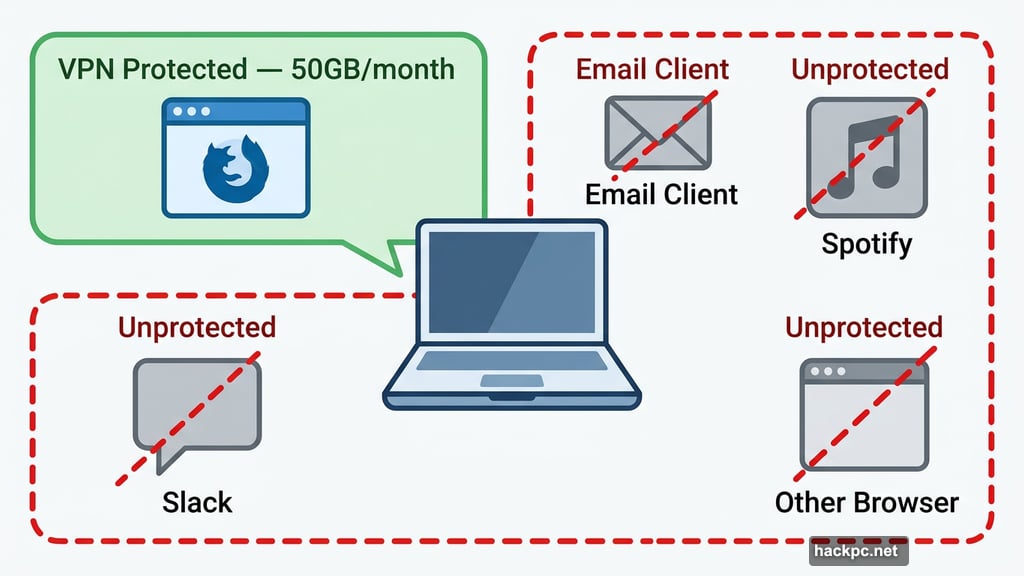
Here’s where you need to pay close attention. Firefox’s built-in VPN only protects traffic running through the Firefox browser itself.
Think about that for a second. Every other app on your computer — your email client, your Spotify, your Slack, any other browser you have open — none of that is covered. Your system processes and background network activity run completely unprotected.
Jacob Kalvo, a cybersecurity expert and CEO of Live Proxies, put it plainly: “The fundamental limitation is scope. It only protects browser traffic, not apps, system processes or other network activity. That creates a false sense of ‘full protection’ for less technical users.”
That last part matters most. If you’re someone who just heard “Firefox has a free VPN now” and assumed your whole device was shielded, it isn’t. Only what you do inside Firefox counts.
![Diagram comparing full-device VPN coverage versus browser-only VPN protection, showing which apps and processes remain unprotected with a browser-based VPN]
How Does It Stack Up Against Proton VPN Free?
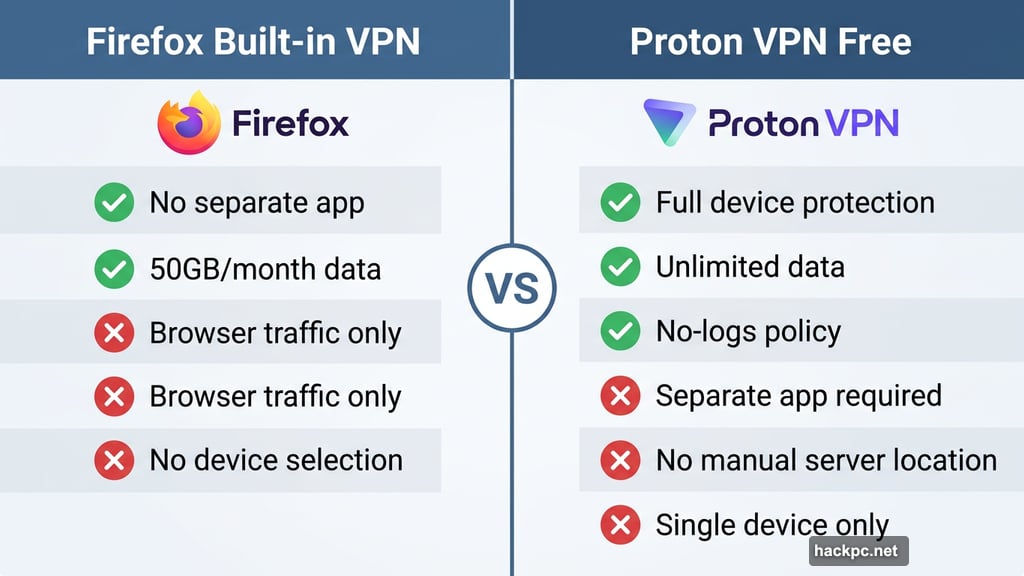
Right now, CNET’s top recommendation for a free VPN service is Proton VPN’s free tier. It’s the only free VPN CNET currently recommends, and for good reason — it has a strong no-logs policy, unlimited data, and full device-level protection.
But Proton VPN’s free plan has its own trade-offs. You can’t manually choose your server location. You can’t connect multiple devices at the same time. And you need to download a separate app to use it.
Firefox’s built-in VPN skips that friction entirely. It’s already there, ready to go. But you get protection in one browser only, not across your phone, your other apps, or anyone else’s device on your network.
For someone who mostly worries about snooping while browsing the web — say, on a coffee shop Wi-Fi — the Firefox option is genuinely useful. For anyone handling sensitive information, logging into financial accounts, or doing anything where full privacy actually matters, Kalvo’s advice is clear: this isn’t the right tool.
Mozilla’s Take on the Free VPN Debate
To be fair, Mozilla isn’t pretending this is something it isn’t. In their announcement, they addressed the well-known risks of sketchy free VPNs directly: “Free VPNs can sometimes mean sketchy arrangements that end up compromising your privacy, but ours is built from our data principles and commitment to be the world’s most trusted browser.”
That’s a reasonable claim. Mozilla has a long track record of prioritizing user privacy, and the security audit history backs that up. A free VPN from Mozilla carries far less risk than a random free VPN you find through a Google search.
Still, Kalvo’s warning stands. For anything involving sensitive data, competitive business information, or large-scale work, this feature isn’t designed for that. Think of it as a lightweight privacy boost for everyday browsing, not a complete privacy solution.
Who Should Actually Use This
If you’re already paying for a full VPN service like NordVPN, ExpressVPN, or Proton VPN’s premium plan, this Firefox feature doesn’t replace that. Those services protect every app on your device and let you pick server locations for streaming or bypassing regional restrictions.
But if you’ve never used a VPN because setting one up felt like too much work, this is a low-effort starting point. It’s already in your browser. It costs nothing. And Mozilla’s reputation gives it more credibility than most free alternatives you’d find on your own.
Just remember what you’re getting. Browser protection for casual browsing — and nothing more. Treat it that way, and it’s a useful little tool. Expect it to do everything a paid VPN does, and you’ll be disappointed.




Comments (0)